SSD Lifespan and Maintenance: How to Make Your Solid State Drive Last Longer
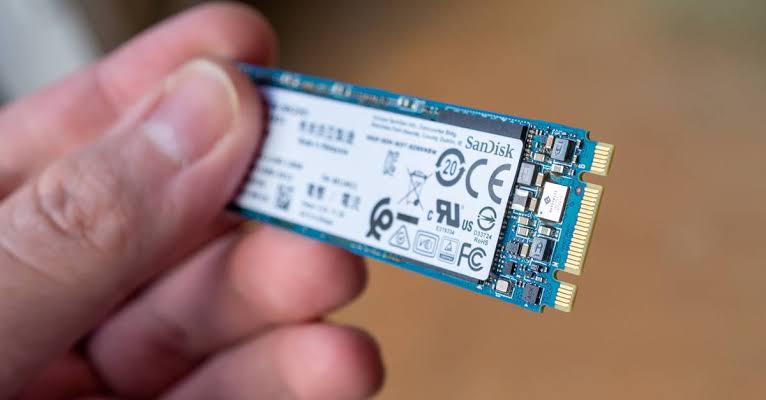
How SSDs Are Different
SSDs (Solid State Drives) manage data differently from old-school Hard Disk Drives. In an HDD, data is written on moving discs using a head, whereas an SSD stores data in NAND cells, with each cell only capable of going through a certain number of write cycles before it starts degrading.
This means SSDs have limited lifespans by default, usually measured in TBW (terabytes written). For example, if you have an SSD with 80TBW, how long it lasts depends on how long you take to write 80TB worth of data on it:
-
10GB per day → ~22 years
-
50GB per day → ~4 years
Important: This doesn’t mean your SSD is sure to die the moment it runs out of write cycles. However, the individual NAND cells start degrading when this happens. Your drive will be more prone to data corruption, won’t operate at full capacity, and the entire SSD can fail at any time.
What Is TBW and How Does It Affect Lifespan?
TBW stands for Terabytes Written. It’s a rating that indicates the total amount of data that can be written to an SSD over its lifetime before the NAND cells begin to degrade.
| SSD Model | Capacity | TBW Rating |
|---|---|---|
| Samsung 990 Pro | 2TB | 1200 TBW |
| Samsung 870 EVO | 1TB | 600 TBW |
| Budget SSD | 256GB | 80–150 TBW |
Real-World Example: If you download 650 GB worth of data every single day, a Samsung 990 Pro (1200 TBW) would take about 5 years to run out of write cycles.
How Wear Leveling Works
If data was written randomly across different cells or in a sequence, certain cells would fail much faster than others, causing the drive to fail sooner than its TBW limit. To combat this, modern SSDs have a feature called wear leveling.
| Feature | Description |
|---|---|
| Wear Leveling | Distributes write cycles evenly across all available NAND cells. |
| Benefit | Prevents any single cell from failing prematurely. |
| Result | Lifespan much closer to the marketed TBW rating. |
Why Free Space Matters
How well wear leveling works depends on how much empty space you have on your drive.
| Scenario | Impact |
|---|---|
| Mostly empty SSD | Data can be distributed among all cells—wear leveling works effectively. |
| Only 20% free space | Fewer cells to distribute data among—specific cells fail faster. |
The Fix: If you want an SSD that lasts long, don’t keep the storage constantly filled with large files and programs. Consider backing up important files to an external drive and deleting ones you no longer need.
Tips to Extend Your SSD’s Lifespan
You can’t extend your SSD’s lifespan beyond its total TBW rating, but there are still things you can do to ensure it reaches that limit.
| Tip | Why It Helps |
|---|---|
| Reduce write cycles | Fewer downloads and large file transfers mean slower TBW depletion. |
| Avoid extreme temperatures | Heat can shorten the lifespan of NAND cells. |
| Keep free space available | Ensures wear leveling works effectively. |
| Avoid defragmenting | Defragmentation is unnecessary and causes extra write cycles. |
| Enable TRIM | Helps the SSD manage unused data blocks more efficiently. |
Pro Tip: Managing PC temperatures and not storing your drives in hot environments is another way of keeping SSDs healthy.
How to Monitor Your SSD’s Health
Knowing how to maintain and care for your SSD is important, but so is knowing how to monitor its health. The easiest way to get an idea of how long your drive will last is to look for its TBW online. If you already have an SSD, you’ll need to monitor its health using built-in tools.
Methods to Check SSD Health
| Method | Description |
|---|---|
| CrystalDiskInfo | Free third-party software that shows drive health, temperature, and TBW used. |
| Samsung Magician | Manufacturer-specific tool for Samsung drives (health, firmware updates, performance). |
| Windows Settings | Settings > Storage > Advanced Storage Settings > Properties (shows health percentage). |
| S.M.A.R.T. | Most modern NVMe SSDs have Self-Monitoring, Analysis, and Reporting Technology built in. |
How to Check SSD Health in Windows
-
Open Settings > System > Storage.
-
Click on Advanced Storage Settings.
-
Click Disks & Volumes.
-
Select your drive and click Properties.
-
Look for the Drive Health percentage.
Pro Tip: Most modern NVMe SSDs have S.M.A.R.T. (Self-Monitoring, Analysis, and Reporting Technology), which makes it incredibly easy to scan their health.
Comparison Table: HDD vs. SSD
| Feature | HDD | SSD |
|---|---|---|
| Data Storage | Mechanical moving discs + head | NAND flash cells |
| Lifespan Limit | Wear and tear on moving parts | TBW (write cycles) |
| Wear Leveling | Not applicable | ✅ Yes |
| S.M.A.R.T. Support | Limited | Extensive |
| Monitoring Tools | Basic | Advanced (CrystalDiskInfo, Magician) |
| Performance | Slower | Much faster |
| Power Consumption | Higher | Lower |
Frequently Asked Questions
What is TBW and why is it important?
TBW stands for Terabytes Written. It measures the total amount of data that can be written to an SSD before NAND cells start to degrade.
How long does an SSD last?
It depends on the TBW rating and your usage. A 1TB SSD with 600TBW can last 10+ years under average use (50GB/day).
Can I extend my SSD’s lifespan?
You can’t extend it beyond the TBW rating, but you can help it reach that limit by reducing writes, keeping free space, and avoiding heat.
What is wear leveling?
Wear leveling is a feature that distributes write cycles evenly across all NAND cells to prevent premature failure of any single cell.
How do I check my SSD health?
Use CrystalDiskInfo, Samsung Magician (for Samsung drives), or check in Windows Settings > Storage > Advanced Storage Settings > Properties.
Does defragmenting an SSD help?
No. Defragmenting is unnecessary for SSDs and can reduce its lifespan by causing extra write cycles.
Quick Reference Summary
| Step | Action |
|---|---|
| 1 | Check your SSD’s TBW rating online. |
| 2 | Monitor health using CrystalDiskInfo or S.M.A.R.T. |
| 3 | Keep at least 20–30% free space for wear leveling. |
| 4 | Avoid writing unnecessary large files. |
| 5 | Keep your SSD cool (avoid extreme temperatures). |
| 6 | Enable TRIM in Windows to improve efficiency. |
Final Thoughts
SSDs are fast, reliable, and quieter than HDDs, but they don’t last forever. Understanding TBW, wear leveling, and how to monitor your SSD’s health can help you avoid unexpected data loss and ensure your drive lasts as long as possible.
The bottom line: A little maintenance goes a long way. Keep an eye on your storage, avoid unnecessary writes, and monitor your SSD’s health regularly—your drive will thank you.