How to Safely Remove a Cracked Glass Screen Protector (Without Damaging Your Phone)
The Cracked Protector Problem
Even if you buy an expensive screen protector, it’s bound to crack if you drop it hard enough. While cracked glass protectors are common, removing them can be tricky—and if you do it incorrectly, you could scratch or chip your phone’s actual display.
Plastic screen protectors generally do not crack, as they’re made from polyethylene terephthalate (PET), which is thin and flexible but doesn’t provide the same level of protection as tempered glass. Removing plastic protectors is as easy as gently peeling them off. Cracked glass screen protectors, on the other hand, are tougher to remove and require a careful approach.
Plastic vs. Glass Screen Protectors: What’s the Difference?
| Feature | Plastic (PET) | Glass (Tempered) |
|---|---|---|
| Material | Thin, flexible polyethylene terephthalate | Tempered glass |
| Cracking | ❌ Does not crack | ✅ Can crack or shatter on impact |
| Protection Level | Low (scratch protection only) | High (impact and scratch protection) |
| Removal | Easy—just peel off | Requires care—can shatter further |
| Adhesion | Weak adhesive | Strong adhesive bond |
Key Takeaway: Glass screen protectors offer better protection but require a proper removal technique to avoid damaging your phone’s display.
Tools You’ll Need
Before you start, gather these items:
| Tool | Purpose |
|---|---|
| Business or credit card | To gently lift the corner of the protector. |
| Invisible tape (e.g., Scotch Tape) | To hold cracked parts together while peeling. |
| Hair dryer | To loosen the adhesive with gentle heat. |
| Isopropyl alcohol wipes (70%) | To remove leftover adhesive from the screen. |
| Microfiber cloth | For final screen cleaning. |
Step-by-Step: How to Remove a Cracked Glass Screen Protector
With the right tools and technique, removing a cracked glass screen protector is straightforward and safe.
Step 1: Turn Off Your Phone
Turn off your phone to prevent the screen from lighting up, which can make it harder to see what you’re doing.
Step 2: Tape Over Cracked Parts
Place pieces of invisible tape over the cracked or shattered areas. This holds the broken glass together and prevents it from splintering further while you peel.
Step 3: Apply Gentle Heat
Hold a hair dryer about six inches away from the screen protector. Use the lowest setting for about 15 seconds to loosen the adhesive.
Pro Tip: Don’t overheat the screen. A few seconds of gentle warmth is enough.
Step 4: Lift a Corner
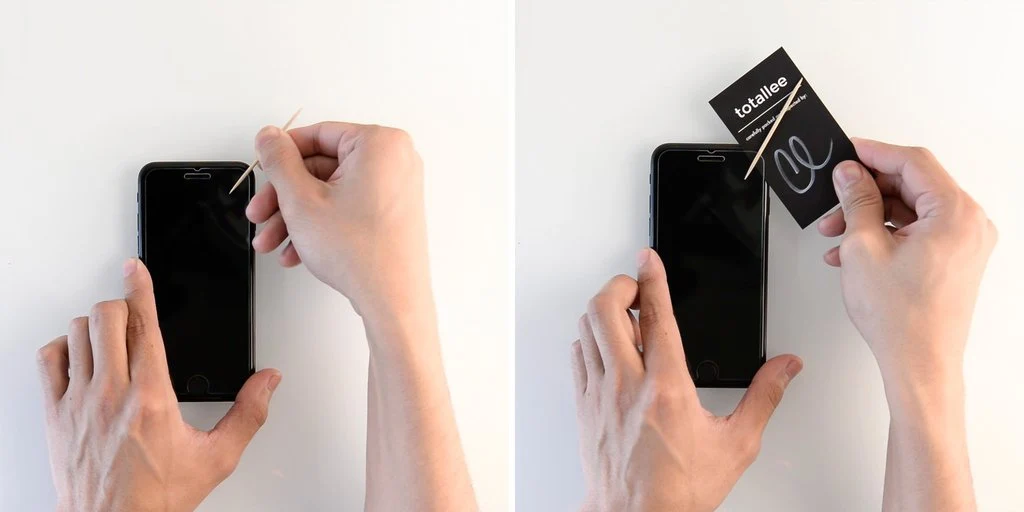
Use a business or credit card to gently lift one corner of the screen protector. Slide the card between the protector and the display.
Step 5: Peel Gently
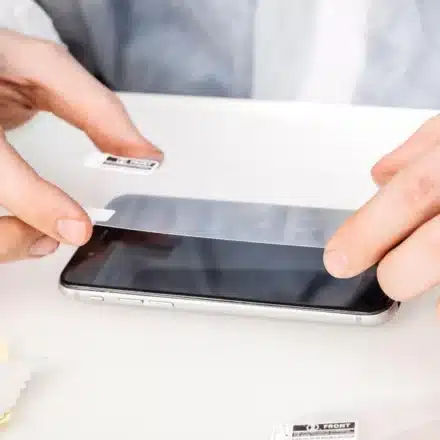
Once the corner is lifted, gently peel off the screen protector. Take your time—don’t force it. If it resists, apply a little more heat and try again.
Warning: Never use metal objects (like knives or tweezers) to pry off the protector. This can scratch or chip your phone’s display.
How to Prepare Your Phone for a New Screen Protector
With the cracked protector removed, you may notice leftover adhesive on the screen, making it feel sticky when you swipe.
Cleaning the Screen
| Step | Action |
|---|---|
| 1 | Use an isopropyl alcohol wipe (70%) to gently wipe the screen. |
| 2 | If you don’t have wipes, dab 70% isopropyl alcohol on a microfiber cloth and wipe the screen. |
| 3 | Remove any leftover adhesive, fingerprint smudges, or dust. |
| 4 | Let the screen air dry, or wipe with a dry section of the cloth. |
⚠️ Important: Ensure your wipes are 70% isopropyl alcohol or less. Anything higher can damage your phone’s oleophobic coating.
What If You Don’t Have Alcohol Wipes?
If the replacement screen protector doesn’t come with wipes, you can buy them separately:
| Product | Price | Quantity |
|---|---|---|
| Med Pride Sterile Alcohol Prep Pads | ~$6.99 | 200 pads |
Once the screen is clean and dry, you’re ready to apply the new screen protector.
What to Avoid When Removing a Screen Protector
| Mistake | Why It’s Dangerous |
|---|---|
| Using metal objects | Can scratch or chip the phone’s display. |
| Prying with force | Concentrated pressure can crack the display. |
| Skipping the tape step | Cracked glass may shatter further, increasing risk. |
| Using high heat | Can damage the phone’s internal components. |
| Using high-concentration alcohol | Can strip the oleophobic coating. |
Remember: A modern flagship phone might not even need a screen protector at all, but if you choose to use one, always replace it carefully.
Comparison Table: Plastic vs. Glass Screen Protectors
| Aspect | Plastic (PET) | Glass (Tempered) |
|---|---|---|
| Protection | Scratch only | Scratch + Impact |
| Cracking | ❌ No | ✅ Yes |
| Removal Difficulty | Easy | Moderate |
| Risk of Damaging Screen | Low | Medium (if done incorrectly) |
| Durability | Low | High |
| Price | ~$5–$10 | ~$15–$40 |
Frequently Asked Questions
Can I remove a cracked screen protector without heat?
Yes, but heat helps loosen the adhesive, making removal easier and reducing the risk of further cracking.
What if the screen protector won’t come off?
Apply more gentle heat and try lifting a different corner. If it’s still stuck, be patient—forcing it can damage the screen.
Can I use a knife to remove a screen protector?
No. Metal objects can scratch or chip your phone’s display. Use a credit card or similar plastic tool.
What happens if I use 90% isopropyl alcohol?
Higher concentrations can damage the oleophobic coating on your phone’s screen, leaving it prone to fingerprints and smudges.
Do I need to replace a cracked screen protector immediately?
Yes. A cracked protector can cause sharp edges and may not provide proper protection from future drops.
Quick Reference Summary
| Step | Action |
|---|---|
| 1 | Turn off your phone. |
| 2 | Tape over cracked areas. |
| 3 | Apply gentle heat with a hair dryer (15 seconds). |
| 4 | Lift a corner with a credit card. |
| 5 | Gently peel off the protector. |
| 6 | Clean the screen with 70% isopropyl alcohol. |
| 7 | Apply a new screen protector. |
Final Thoughts
Removing a cracked glass screen protector doesn’t have to be stressful. With the right tools—a credit card, tape, and gentle heat—you can safely remove it without damaging your phone’s display.
The bottom line: Take your time, avoid metal tools, and always clean the screen thoroughly before applying a new protector. Your phone will thank you.