Why Is Recaptcha.net Consuming My Child’s Screen Time on iPhone? How to Fix It

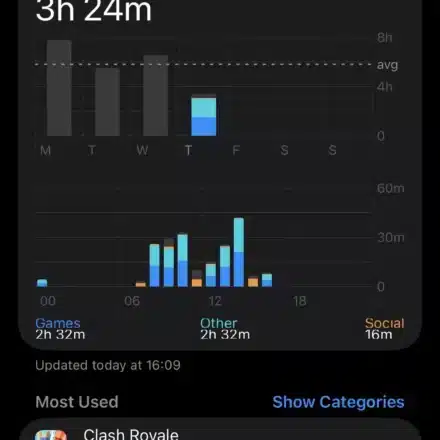
Many parents checking their child’s Screen Time reports are confused to find recaptcha.net consuming hours of daily usage. This is typically not a virus, but a technical glitch where the iPhone misattributes time spent inside apps and games to this domain. The issue arises because recaptcha.net is a legitimate Google service used for bot verification, and when it loads within an app’s built-in browser, iOS can incorrectly log all subsequent activity under its name. Restoring accurate reporting requires specific troubleshooting steps.
Table of Contents
Restoring Accuracy to Screen Time Monitoring
The phantom logging of recaptcha.net is a known software bug related to how iOS tracks activity from embedded web components inside applications. This often happens during gameplay in specific apps, such as those from developers like Supercell, where the reCAPTCHA service runs in the background.
1. Update iOS and All Applications
Since this is a software tracking issue, the first step is to ensure your device has the latest bug fixes from both Apple and app developers. Google has also released updates to its reCAPTCHA software development kit (SDK) to address this.
-
Go to Settings > General > Software Update and install any available iOS updates.
-
Open the App Store, go to your profile, and update all applications, especially games and social media apps.
2. Set a Direct Limit for the Recaptcha.net Domain
A practical workaround is to apply a minimal time limit directly to the domain. This can sometimes force the system to stop the excessive logging.
-
Navigate to Settings > Screen Time > App Limits.
-
Tap Add Limit and expand the Websites category.
-
Select Add Website, type
recaptcha.netexactly, and set a limit of 1 minute.
3. Identify and Force-Quit the Problematic Apps
The phantom time is often logged when an app using reCAPTCHA remains active in the background. Fully closing these apps can stop the erroneous tracking.
-
Open the App Switcher (swipe up from the bottom and hold, or double-press the Home button).
-
Swipe up on all open apps, particularly games your child uses frequently.
4. Block the Domain Using Web Content Restrictions
If limiting doesn’t work, you can completely block the device from connecting to recaptcha.net. This eliminates the source of the misreported data.
-
Go to Settings > Screen Time > Content & Privacy Restrictions and turn it on.
-
Tap Content Restrictions > Web Content.
-
Choose Limit Adult Websites and under Never Allow, tap Add Website and enter
recaptcha.net.
5. Reconfigure the “All Apps & Categories” Limit
A more advanced workaround is to create a custom “All Apps” limit that deliberately excludes the “Websites” category. This is effective if your child doesn’t use a web browser.
-
Go to Settings > Screen Time > App Limits.
-
Remove any existing “All Apps & Categories” limit.
-
Tap Add Limit and manually select every category except for Websites.
FAQ
What is recaptcha.net?
It is a legitimate Google domain used by websites and apps to verify that a user is human and not a bot. Its appearance in Screen Time is a logging error, not malware.
Will deleting an app fix this?
Yes, if the phantom usage is tied to one specific application, deleting that app will remove the source. However, the bug could reappear with another app that uses the same service.
Why did this start after a software update?
Major iOS updates can change how the system categorizes network traffic from embedded browsers, sometimes causing previously hidden background activity to be misreported.
Conclusion: Effective Digital Boundary Management
Addressing the phantom recaptcha.net usage requires understanding that it’s a reporting bug, not actual screen time. While Apple and Google work on permanent fixes, parents can use the workarounds above—updating software, setting limits, force-quitting apps, and blocking the domain—to restore accuracy to their Screen Time reports. Staying vigilant with these settings is key to maintaining effective digital boundaries and ensuring that your family’s device usage is managed based on correct information.