Why recaptcha.net Shows Up in Screen Time and How to Fix It
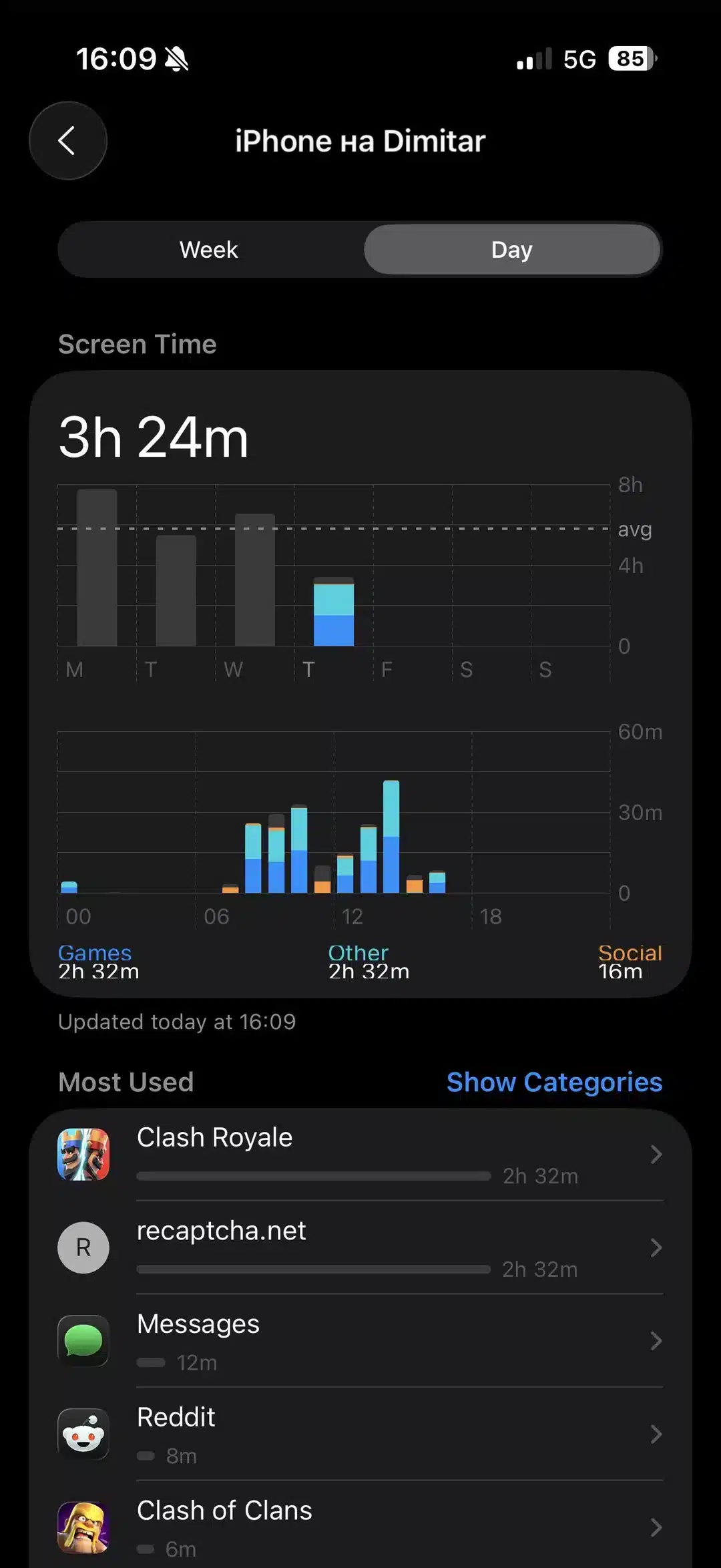
Many parents are confused to see recaptcha.net logging hours of activity in their child’s Screen Time report. This is usually not a sign of a security issue, but a common software bug. The operating system mistakenly attributes time spent inside apps and games that use Google’s reCAPTCHA service to this verification domain. Here’s how to correct the reporting and restore accuracy to your monitoring.
Understanding the Cause
The phantom usage occurs because many apps and games use an embedded web browser to handle tasks like login verification. Screen Time sometimes misclassifies this internal activity, logging it as time spent on the recaptcha.net website itself, even though no separate browser was used.
How to Fix the Phantom Usage
-
Update Software: The first and most important step is to ensure both the device’s operating system and all apps (especially games) are updated to their latest versions. Developers often release patches that fix these tracking inaccuracies.
-
Set a Limit on the Domain: You can “trick” the system into stopping the excessive logging by applying a minimal limit to the domain itself.
-
Go to Settings > Screen Time > App Limits > Add Limit.
-
Select Websites, tap Add Website, and enter
recaptcha.net. -
Set a very short limit, like 1 minute.
-
-
Restrict Web Content: For a more definitive block, you can prevent the device from accessing the domain entirely.
-
Navigate to Settings > Screen Time > Content & Privacy Restrictions > Content Restrictions > Web Content.
-
Choose “Limit Adult Websites” and add
recaptcha.netto the Never Allow list.
-
-
Force-Quit Problematic Apps: The phantom logging can happen when an app remains active in the background. Fully close apps, especially games, by using the App Switcher (swiping up on the app’s preview) after use.
FAQ
-
Is recaptcha.net malware? No, it is a legitimate Google service used by millions of websites and apps to verify users.
-
Will deleting an app fix it? Yes, if the phantom usage is tied to one specific app, deleting it will remove the source. However, the bug could reappear with another app later.
By applying these targeted fixes, you can eliminate the misleading data in your Screen Time reports and ensure your family’s digital boundaries are accurately reflected.