PS5 Fan Noise and Overheating: What I’ve Learned From Fixing Dozens of Consoles
I’ve been inside PlayStation consoles since the PS3’s “Yellow Light of Death” era. I’ve replaced thermal paste, reflowed solder joints, and pulled cat hair out of heat sinks that looked like small animals. So when people tell me their PS5 sounds like a jet engine or shuts off mid-game, I don’t panic. I’ve seen it all.
The PS5 is generally reliable. But after a few years, cooling issues pop up. Most are easy fixes. A few are serious. Let me walk you through what I’ve learned from the bench.
The First Mistake Almost Everyone Makes (Including Me)
When my own PS5 started getting loud, I immediately assumed the fan was dying. I ordered a replacement, watched a teardown video, and spent an hour swapping it out. The noise was still there. I’d wasted $40 and two hours.
Turns out, the console was just sitting in a cubby that was too small. The hot air had nowhere to go. It was recirculating. I pulled it out into open air, and the fan quieted down immediately. That’s when I learned: check positioning before you blame hardware.
Sony recommends at least 4 inches (10 cm) of space on every side. That’s a minimum. I’ve seen consoles crammed into shelves with barely an inch. The fan runs at full speed constantly trying to pull air through a straw. Don’t do that. Also, never put your PS5 on carpet. The bottom intake gets choked. Put it on a hard surface – wood, glass, metal.
Dust: The Silent Killer (And How I Clean It Wrong)
Dust is the number two culprit. It acts like a blanket. It traps heat. It clogs vents. I’ve opened PS5s that looked like they’d been buried in a sandstorm.
Here’s the mistake I made for years: I used canned air from the outside. That just pushes dust into the console. It gets trapped deeper. Then it cakes onto the heat sink fins. Then you’re really stuck.
Now I do this:
-
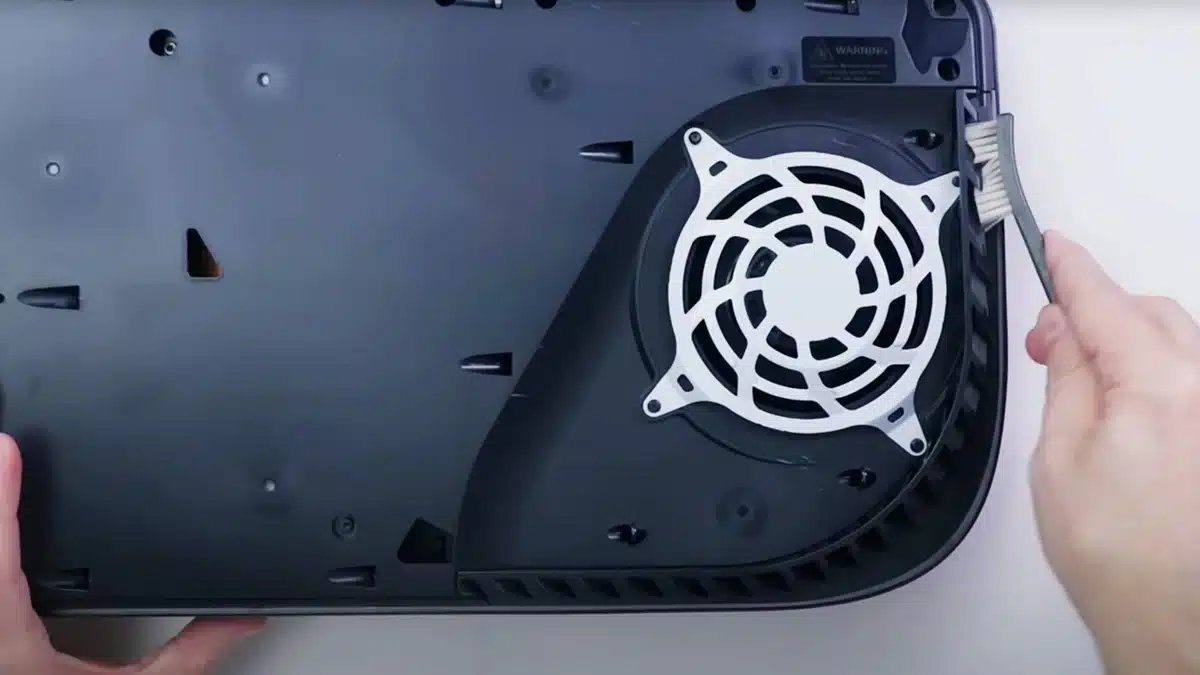
Remove the white side panels (they clip off – look up a video, it’s easy and won’t void your warranty in most regions).
-
Use a vacuum with a brush attachment on the fan and heat sink exhaust. Or use compressed air while holding the fan still (spinning it with air can generate voltage and damage the motherboard – I learned that on a PC build).
-
For deep cleaning, I remove the fan entirely – it’s two screws and a cable. Then I can get to the heat sink properly.
If you’re not comfortable opening the console, at least use a soft brush to loosen dust before blowing. And do it outside.
The Liquid Metal Problem (Yes, It’s Real)
Here’s where it gets weird. The PS5 uses liquid metal thermal compound instead of traditional paste. It’s great for heat transfer. But on some older consoles, especially those stored vertically, the liquid metal can seep out from between the APU and the heat sink. It drips onto surrounding components. It can cause shorts or just leave a dry spot on the chip, leading to hotspots and overheating.
I’ve seen this firsthand. A client brought in a launch-day PS5 that shut off after 20 minutes of gameplay. Opened it up – the liquid metal had migrated. There was a bare patch on the chip. I carefully spread it back (took 15 minutes) and the console has been fine for a year.
What you can do: If you have an older PS5 and you’ve been storing it vertically, try laying it horizontally. Gravity helps keep the liquid metal in place. If the overheating persists, you need a repair. Don’t DIY liquid metal unless you’re experienced – it’s conductive and can brick your console if you spill.
Third-Party SSDs: The Overlooked Culprit
I added a 2TB NVMe SSD to my PS5. Worked great for a month. Then the console started running hot and the fan was loud. Turns out, the drive didn’t have a proper heat sink. It was dumping heat into the already-warm console.
Sony’s M.2 slot has a thermal pad and a metal cover, but that’s often not enough for high-speed drives. You need an SSD that comes with its own heat sink – or buy a third-party heat sink. I switched to a drive with a thick aluminum radiator and thermal pads underneath. Problem solved.
Mistake I made: I thought “cheaper drive, I’ll save money.” I ended up buying two drives. Don’t be me. Spend the extra $20-30 for a model with a heat sink. Sabrent, WD Black, Samsung – they have PS5-ready versions.
When to Worry (And When to Ignore It)
A little fan noise is normal. The PS5’s fan ramps up during demanding games (Cyberpunk 2077, Horizon Forbidden West). That’s fine. But if your console:
-
Shuts off completely with a “too hot” message
-
Crashes to a black screen mid-game
-
Sounds like a vacuum cleaner even at the main menu
-
Feels extremely hot to the touch on the top or back
…then you have a problem. Don’t ignore it. I’ve seen consoles that were run for months with failing fans. The heat eventually warped the motherboard solder joints. That’s a 400repairinsteadofa20 fan.
My Personal Maintenance Schedule (What Actually Works)
I clean my own PS5 every six months. That sounds like a lot, but it takes 20 minutes and I do it while watching a show.
-
Unplug everything (don’t skip this – I’ve zapped myself).
-
Remove panels. Vacuum the main dust traps (Sony built two vacuum holes – look near the top corners).
-
Remove the fan (T8 Torx screwdriver). Blow out the fan blades and heat sink.
-
Wipe down the exterior vents with a dry microfiber.
-
Check the fan for wobble – if it’s loose, replace it. Stock fans are cheap on eBay or iFixit.
-
Put it back together. Place it in open air, not a closed cabinet.
I’ve done this on four different PS5s (mine, friends, family). None have ever overheated.
Final Pro Tip From the Bench
If your PS5 is still under warranty and acting up, send it to Sony. Don’t open it. I’ve seen people lose warranty coverage because they stripped a screw or broke a ribbon cable. But if you’re out of warranty and handy with electronics, most fixes are doable. The fan is a 30-minute swap. Liquid metal respreading is an hour. Just watch three different teardown videos before you start – each one has a missing step.
And for the love of gaming, don’t put your PS5 inside a closed cabinet. I’ve seen consoles literally cook themselves. Fresh air is free.
Now go check your PS5 placement. And maybe order some canned air.