NetMirror for iOS: A Complete Guide to Access, Safety, and Legal Alternatives
The Rise of Free Streaming Mirrors
With streaming service subscription costs climbing steadily, many users find themselves overwhelmed by the financial burden of juggling multiple OTT platforms. Enter NetMirror—a popular, free streaming mirror that offers access to an extensive and frequently updated library of movies and TV shows. But with zero cost comes a critical question: is it safe and legal?
This comprehensive guide explores everything you need to know about NetMirror for iOS devices, including how to access it, the legal implications, and a curated list of safer, legitimate alternatives.
What Is NetMirror for iOS?
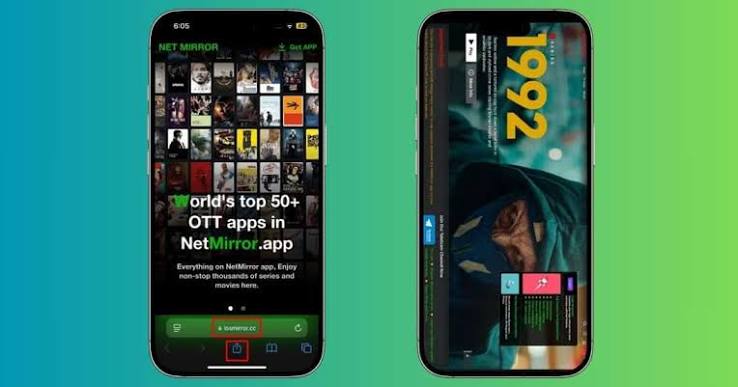
NetMirror functions as a mirror portal for popular OTT websites, including Prime Video, Netflix, Disney+, Hotstar, and over 50 other on-demand video subscription services. Its key selling points include:
-
No Ads: Unlike many free streaming platforms, NetMirror claims to offer an ad-free viewing experience without in-app or in-video advertisements.
-
Automatic URL Redirection: The actual content-streaming website uses a temporary URL. When you visit the portal, you are automatically redirected to the most updated, working NetMirror website—eliminating the hassle of hunting for active links.
-
No Native iOS App: There is no official NetMirror application available on the Apple App Store. Instead, the service relies on a Safari-based web integration that functions similarly to a native app.
How NetMirror Works on iPhones and iPads
Unlike Android, where users can download and install APK files, iOS does not support direct sideloading of third-party apps without complex workarounds. NetMirror circumvents this by offering a web-based shortcut that you can save to your iPhone or iPad home screen.
Is NetMirror Legal and Safe?
This is the most critical question surrounding NetMirror—and the answer is nuanced.
Legal Concerns
-
Copyright Violations: NetMirror mirrors paid OTT platforms without official partnerships or licensing agreements. This places it in legally questionable territory, depending on your region’s copyright laws.
-
Streaming vs. Downloading: Even if you do not download any content, streaming unlicensed material can still constitute a violation of copyright law in many jurisdictions.
-
VPN Usage: While using a VPN may offer increased privacy, it does not make unauthorized streaming legal. It merely masks your activity.
Safety Risks
-
Malware and Phishing: Third-party streaming sites often carry risks of malicious ads, trackers, and phishing attempts.
-
Data Privacy: Unverified platforms may collect and misuse your personal data without your knowledge.
-
ISP Blocking: Internet Service Providers (ISPs) and entertainment media companies frequently crack down on such platforms, leading to sudden downtime.
Verdict: While NetMirror is technically accessible, it is not recommended due to significant legal and security risks. Proceed with extreme caution.
How to Get NetMirror for iOS (Step-by-Step Guide)
Since there is no official app, you must use a Safari-based workaround to create a home screen shortcut. This process is identical for all iPhone, iPad, and Mac models.
Time Needed: Approximately 3 minutes
Step-by-Step Instructions
| Step | Action |
|---|---|
| 1 | Open the Safari web browser on your iPhone. Note: This method does not work with Chrome, Firefox, or other third-party browsers. |
| 2 | Visit the official NetMirror iOS mirror portal. (URLs change frequently due to ISP blocking; search for the current active link.) |
| 3 | Tap the Share button on the bottom toolbar (the square with an upward arrow, located in the middle of the toolbar). |
| 4 | Scroll down the menu that appears until you find Add to Home Screen. Tap on this option. |
| 5 | Keep the suggested name as is, or customize it. Tap the Done button on the keyboard. |
| 6 | Tap Add in the top-right corner of the screen. |
| 7 | The NetMirror website is now saved as an icon on your iPhone home screen, functioning like a pseudo-app. |
Pro Tip: If the web URL changes in the future, the shortcut will automatically redirect you to the updated NetMirror portal.
Safer Legal Alternatives to NetMirror for iOS
Given the legal and safety concerns surrounding NetMirror, consider these legitimate, App Store-approved alternatives that offer free or low-cost streaming options.
1. Pluto TV
| Feature | Details |
|---|---|
| Cost | Free (ad-supported) |
| Content | Live TV channels + On-Demand library |
| Availability | App Store |
| Best For | Binge-worthy TV series, classic movies, reality TV |
Overview: Pluto TV offers a robust Live TV section with continuous programming, plus an On Demand section featuring titles across genres like Comedy, Classic TV, Sci-Fi, Drama, and more. Expect ads between and during shows.
2. Peacock
| Feature | Details |
|---|---|
| Cost | Starts at $7.99/month |
| Content | NBC & Bravo hits, Peacock Originals, Sunday Night Football, 50+ channels |
| Availability | App Store |
| Best For | Premium network shows, live sports, reality TV |
Overview: Peacock is a premium streaming service from NBCUniversal. It includes current NBC & Bravo hit shows, exclusive Peacock Originals, Sunday Night Football, and over 50 always-on channels. Unlike NetMirror, it is a fully legal, subscription-based platform.
3. Tubi
| Feature | Details |
|---|---|
| Cost | Free (ad-supported) |
| Content | 250,000+ TV shows and movies |
| Availability | App Store |
| Best For | Massive library, diverse genres, international availability |
Overview: Tubi is a free, ad-supported video-on-demand (AVOD) service available in the US, Mexico, Canada, LATAM, Australia, and the UK. With a library of over 250,000 titles, it offers extensive content across all genres. Ads typically run at a rate of approximately four 2-minute ads per hour of content.
4. Kodi
| Feature | Details |
|---|---|
| Cost | Free (open-source) |
| Content | Customizable with add-ons for sports, movies, live TV, and more |
| Availability | Sideload via AltStore or Cydia (not on App Store) |
| Best For | Advanced users, customization, wide genre coverage |
Overview: Kodi is a powerful, open-source media player platform. The latest stable version, Kodi v21.1 (Omega), runs on any iPhone or iPad running iOS 11 or iPadOS 11 or later. It is completely free and supports a vast ecosystem of add-ons for sports, romantic, comedy, thriller, live TV, reality shows, and more. However, Kodi is not available on the App Store—you must download the IPA file and sideload it using tools like AltStore or Cydia.
Comparison Table: NetMirror vs. Legal Alternatives
| Feature | NetMirror | Pluto TV | Peacock | Tubi | Kodi |
|---|---|---|---|---|---|
| Cost | Free | Free | From $7.99/month | Free | Free |
| Legal | ❌ Questionable | ✅ Fully Legal | ✅ Fully Legal | ✅ Fully Legal | ✅ Platform is legal* |
| App Store | ❌ No | ✅ Yes | ✅ Yes | ✅ Yes | ❌ No (sideload) |
| Ads | ❌ Limited/None | ✅ Yes | ✅ Yes (on free tier) | ✅ Yes | ✅ Depends on add-ons |
| Content Library | Mirror of paid OTT | Live TV + On-Demand | Premium NBC content | 250,000+ titles | Customizable |
*Kodi itself is a legal media player; legality depends on the add-ons and content sources you use.
Important Security Warning
If you choose to use NetMirror or similar third-party streaming services:
-
Do not enter personal or financial information on these platforms.
-
Use a reputable VPN to protect your privacy (though this does not make streaming legal).
-
Be aware that ISPs and governments may block access to such sites.
-
Keep your device’s security software updated to protect against potential malware.
The Bottom Line
NetMirror offers a tempting proposition—free, ad-free access to premium content. However, it operates in a legally gray area with significant copyright and security risks. For a safer, more reliable experience, consider legal alternatives like Pluto TV, Tubi, Peacock, or exploring Kodi with legitimate add-ons.
If you value your privacy, device security, and peace of mind, the small subscription fee of legal platforms is a worthwhile investment compared to the potential risks of unverified third-party services.
Frequently Asked Questions
Is NetMirror available on the App Store?
No. NetMirror does not have an official iOS app. It is accessed via a Safari browser shortcut saved to your home screen.
Can I get in trouble for using NetMirror?
Depending on your region, streaming unlicensed content may violate copyright laws. While prosecution of individual users is rare, it is a legal risk.
Does a VPN make NetMirror legal?
No. A VPN only masks your IP address for privacy. It does not change the legal status of unauthorized streaming.
Is Tubi completely free?
Yes. Tubi is completely free and ad-supported. No credit card or subscription is required.
Is Kodi safe to use?
Kodi itself is safe and open-source. However, third-party add-ons may contain malware or offer illegal content. Only use trusted repositories.