NAT Types Explained: How to Fix Strict NAT and Get Open NAT
What Is NAT?
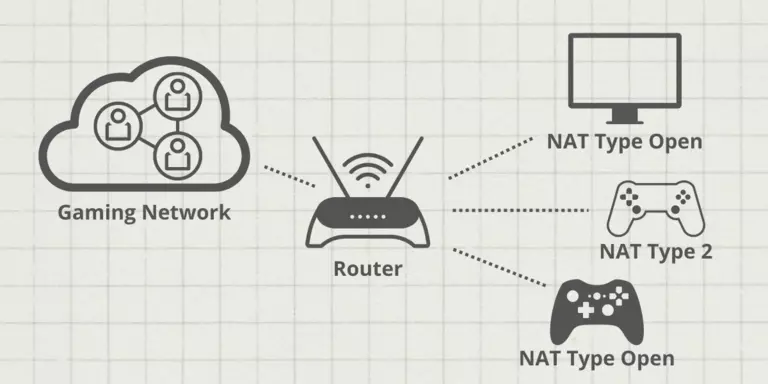
NAT stands for Network Address Translation. It refers to how your router translates your devices’ private local IP addresses into a single public IP address, which ultimately lets you connect to the internet.
There are usually three main types for gaming and home networking:
| NAT Type | Also Known As | Connectivity |
|---|---|---|
| Open NAT | Type 1 / Type A | Unrestricted—can connect to anyone. |
| Moderate NAT | Type 2 / Type B | Some restrictions—connects to Open and Moderate. |
| Strict NAT | Type 3 / Type C | Most restrictive—only connects reliably to Open NAT. |
The Three NAT Types
Open NAT (Type 1 / Type A)
Incoming connections on specific ports are allowed to reach your device unhindered (usually via UPnP or explicit Port Forwarding). This is the ideal setting for online gaming.
| Capability | Open NAT |
|---|---|
| Host games | ✅ Yes |
| Connect to others | Any NAT type |
| Voice chat | ✅ Full functionality |
Moderate NAT (Type 2 / Type B)
Moderate NAT has some restrictions but is generally accessible enough to play online and connect to other players with the same NAT type or those who have Open NAT.
| Capability | Moderate NAT |
|---|---|
| Host games | ⚠️ Sometimes |
| Connect to others | Open and Moderate only |
| Voice chat | ⚠️ May be limited |
Strict NAT (Type 3 / Type C)
Strict NAT is the most restrictive. It significantly limits online traffic through your router—you can essentially only connect reliably to others with Open NAT.
| Capability | Strict NAT |
|---|---|
| Host games | ❌ Rarely |
| Connect to others | Open NAT only |
| Voice chat | ❌ Often blocked |
What NAT Type Errors Look Like
NAT type errors can be a frustrating experience. Depending on your NAT type, you might:
-
Not be able to host a multiplayer session freely.
-
Struggle to connect to other players seamlessly.
-
Experience dropped connections or lag spikes.
-
Be unable to use voice chat features.
Example: You could be at school, simply trying to pass time playing Minecraft during breaks. But if the school’s network enforces Strict NAT, it may prevent students from hosting or joining peer-to-peer multiplayer sessions. Without access to the school’s router administrative settings, options will be limited.
How to Fix NAT Errors (With Router Access)
If you have access to your router, fixing a NAT error is often much simpler.
1. Enable UPnP
UPnP (Universal Plug and Play) allows devices on your network to automatically forward ports without manual configuration.
Steps:
-
Log into your router’s admin page (usually via
192.168.0.1or192.168.1.1). -
Find the UPnP or Port Forwarding section.
-
Enable UPnP.
-
Save settings and reboot both your router and connecting devices.
If that doesn’t fix it: Move on to port forwarding.
2. Set a Static IP and Configure Port Forwarding
Port forwarding manually routes specific traffic to a designated device on your network.
Steps:
-
Set a static IP (or DHCP reservation) on your gaming device so it always gets the same local IP address.
-
Log into your router’s admin page.
-
Navigate to Port Forwarding or Virtual Server settings.
-
Create a rule for the required ports for your game:
-
Minecraft (Java): TCP/UDP port
25565 -
Xbox Live: UDP
88,500,3544,4500 -
PlayStation Network: TCP
80,443,3478-3480
-
-
Forward the traffic to your device’s static IP.
Pro Tip: You can look up specific port forwarding rules for your game online.
3. Enable Bridge Mode (for Double NAT)
Double NAT occurs when two routers are connected in series, causing one NAT to sit inside another. This often happens when your internet service provider’s modem/router is also routing traffic.
How to Fix:
-
Log into your main router (the one connected to your modem).
-
Find the Bridge Mode setting.
-
Enable it to effectively pass all traffic to the second router.
How to Get Open NAT Without Router Access
If you’re on a network where you don’t have admin access (like a school dorm, office, or shared Wi-Fi), there are workarounds.
1. Using a VPN with Port Forwarding
A VPN rarely gives you Open NAT access without a workaround. Instead, you’ll typically get Type 2 (Moderate) or Type 3 (Strict).
| VPN Setup | Resulting NAT Type |
|---|---|
| Standard VPN | Type 2 or Type 3 |
| VPN with port forwarding | Can achieve Type 2 |
| VPN with dedicated static IP | Best chance at Open NAT |
Pros:
-
Adds security.
-
Bypasses local network restrictions.
Cons:
-
Rarely gives Open NAT.
-
Can add latency.
2. Using a Mobile Hotspot
A safe fix is to turn on hotspot sharing, then pair that with a VPN that supports port forwarding or has a dedicated static IP.
Limitations:
The quality will depend on your mobile plan (5G or premium LTE).
Data caps apply.
Your device’s battery will be affected—hotspots are a significant battery drain.
Mobile carriers often use Carrier-Grade NAT (CGNAT), which defaults to Strict NAT.
Workaround: Use port forwarding via a VPN to bypass the NAT restrictions.
Data Usage Estimates for Gaming
Keep in mind that using your mobile data while gaming consumes varying amounts of bandwidth.
| Game | Data Usage (per hour) |
|---|---|
| Minecraft (Java) | 40–300 MB |
| Minecraft (hosting) | Higher (toward 300 MB) |
| Overwatch 2 | ~150 MB |
| Genshin Impact | ~60 MB |
| Call of Duty | ~80–200 MB |
Pro Tip: Ensure you have a data plan that supports at least 5GB to 10GB (most use 15–20GB a month) if you’re doing this five days a week, not including updates.
Comparison Table: NAT Types and Their Impact
| Aspect | Open NAT (Type 1) | Moderate NAT (Type 2) | Strict NAT (Type 3) |
|---|---|---|---|
| Host Games | ✅ Yes | ⚠️ Sometimes | ❌ Rarely |
| Connect to Others | Any NAT Type | Open & Moderate | Open NAT only |
| Voice Chat | ✅ Full | ⚠️ Limited | ❌ Often blocked |
| Matchmaking Speed | Fastest | Moderate | Slow |
| UPnP Required? | No (can also forward ports) | No | No |
| Best For | Unrestricted gaming | General gaming | Troubleshooting |
Frequently Asked Questions
What is the best NAT type for gaming?
Open NAT (Type 1) is the best for gaming. It allows you to host games, connect to anyone, and enjoy full voice chat functionality.
How do I check my NAT type?
On Xbox: Settings > Network > Network Settings. On PlayStation: Settings > Network > Test Internet Connection. On PC: Check your game’s network settings.
Will enabling UPnP fix Strict NAT?
Yes, in many cases. UPnP automatically forwards required ports, which can resolve Strict NAT issues.
Can a VPN give me Open NAT?
Not usually. A standard VPN will give you Moderate (Type 2) or Strict (Type 3) NAT. You may need a VPN with port forwarding to improve your NAT type.
What is Double NAT and how do I fix it?
Double NAT occurs when two routers in a row both perform NAT. Fix it by enabling Bridge Mode on the first router or connecting directly to the modem.
Quick Reference Summary
| Step | Action |
|---|---|
| 1 | Check your current NAT type in your device’s network settings. |
| 2 | If Open NAT: You’re good to go. |
| 3 | If Moderate/Strict: Log into your router admin panel. |
| 4 | Enable UPnP and reboot devices. |
| 5 | If that fails: Set a static IP and configure port forwarding. |
| 6 | If you have Double NAT: Enable Bridge Mode. |
| 7 | If no router access: Try a VPN with port forwarding or a mobile hotspot. |
Final Thoughts
NAT type errors can be a frustrating roadblock to online gaming, but they’re rarely unsolvable. Whether you have router access or not, there are ways to improve your NAT type.
The bottom line: Start with the simplest fix (enabling UPnP) and work your way up. If you’re stuck behind a strict network, a combination of VPN and mobile hotspot can be a lifesaver—just watch your data usage and battery life.