How to Get the Best Sound from Your Anker Soundcore Earbuds
Why Sound Is Subjective
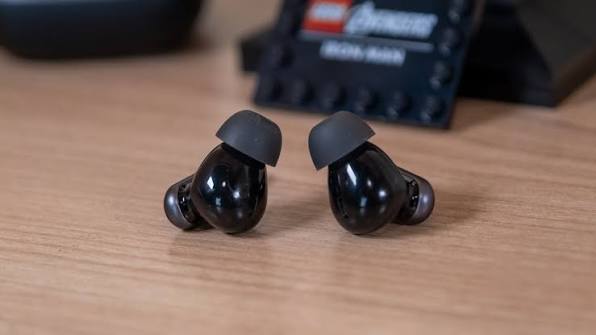
Yes, ditching earbuds for heavy-duty headphones will get you a better sound. Yet, you can’t really beat the former for blasting jams on the go, and if you’re rocking some of the best wireless earbuds—like the Anker Soundcore—chances are you’ll be happy with the sound reproduction.
The problem is: sound quality is often subjective. What works for the majority may not work for you. Taking it a step further, the base EQ on the earbuds may also not do justice to the genre you’re listening to. Heavy low-end doesn’t make sense for jazz, for instance, but is amazing for styles like hip-hop and funk.
The good news? You’re not stuck with the default sound profile. This guide walks you through every method available—from basic fit adjustments to advanced EQ settings—so you can find the perfect sound for your ears.
Start with the Basics: Fit and Seal
Going by recommendation from Anker itself, improving your sound has nothing to do with EQ settings—at least not at first. The company suggests checking if you’re wearing the earbuds properly.
Why This Matters: A proper seal creates a physical barrier that traps low frequencies, dramatically improving bass response and overall clarity. Without it, even the best EQ settings can’t compensate for sound leakage.
Upgrade Your Bluetooth Codec: LDAC
If you’re using an Android device, switching to a better Bluetooth codec like LDAC can significantly improve audio quality—and Anker actually recommends it.
| Codec | Bitrate | Sound Quality |
|---|---|---|
| SBC | 328 kbps | Standard Bluetooth quality |
| AAC | 250–320 kbps | Good for Apple devices |
| LDAC | Up to 990 kbps | 3x the sound detail of standard codecs |
How to Enable LDAC:
-
Open the Soundcore app.
-
Go to Settings > Sound Mode.
-
Select LDAC for high-resolution audio.
Note: LDAC is available on many Soundcore models, including the Liberty series, Space A40, P31i, and newer releases. Not all Soundcore earbuds support LDAC, so check your model’s specifications.
HearID: Your Personalized Sound Profile
If songs still sound bad after optimizing fit and codec, open the Soundcore app and fire up HearID. This feature tests your hearing and creates a sound profile with a custom EQ curve that should—at least in theory—work perfectly for your ears.
How HearID Works
“Your ears and hearing are as unique as your fingerprints. Earbuds that sound incredible to you may sound only mediocre to someone else. To ensure everyone gets a flawless listening experience, HearID intelligently tests your hearing and creates a tailor-made sound profile just for your ears.”
The Catch
While many users have had their minds blown by the feature and swear they could hear new details, others have gone as far as to dub HearID nothing more than snake oil. The app tests your hearing across different frequencies and adjusts the EQ to compensate for any perceived deficiencies.
Pro Tip: If you find the HearID profile a little lacking, you can combine it with a preset EQ. For example, run the HearID test, then select the option to combine HearID with the Bass Boost preset EQ if you want more low-end punch.
Mastering the Soundcore EQ
If your experience with HearID left you wondering if Soundcore earbuds are even good, don’t give up just yet. You still have a bunch of fun EQ settings to explore.
22 Preset Equalizers
The saving grace of many modern audio products is that you’re not stuck with their default sound profile. If Anker’s “Signature” preset out of the box isn’t doing it for you, you’ve got 22 other EQ presets at your disposal.
| Preset Category | Examples |
|---|---|
| Bass Adjustments | Bass Booster, Bass Reducer |
| Treble Adjustments | Treble Booster |
| Genre-Specific | Classical, Acoustic, Hip-Hop |
| Voice-Focused | Podcast, Vocal Booster |
Pro Tip: The Soundcore app also allows you to customize the EQ by going to app > HearID > Default EQ to tailor the sound to your preference.
The 8-Band Parametric EQ
If presets still sound “meh,” feel free to use them as a starting point for further adjustment. The frequency response is fully customizable with a nice 8-band parametric EQ.
The Bands:
| Band | Frequency Range | Effect |
|---|---|---|
| 1 | Sub-bass | Deep rumble and impact |
| 2 | Bass (200Hz) | Punch and warmth |
| 3 | Lower mids (400Hz) | Body and fullness |
| 4 | Mids (800Hz) | Clarity and presence |
| 5 | Upper mids | Vocal definition |
| 6 | Lower treble | Attack and bite |
| 7 | Treble | Brightness and air |
| 8 | High treble | Sparkle and detail |
Fixing “Boxy” Sound
You may have to account for the physical limitations of earbuds (their small size), which can affect sound quality. Some hear it as hollow-sounding, but a more precise description is “boxy.”
The Fix: Cut that out with the EQ by lowering the gain of the second and third bands (200Hz to 400Hz) or even the fourth one (800Hz) if the boxiness is more pronounced with your particular buds.
The Community-Recommended EQ Setting
Still not satisfied? In one Reddit thread, the top commenter may have cracked the EQ puzzle.
Try this 8-band EQ setting:
| Band | Value |
|---|---|
| 1 (Sub-bass) | +5 |
| 2 (Bass) | +3 |
| 3 (Lower mids) | -1 |
| 4 (Mids) | -3 |
| 5 (Upper mids) | +3 |
| 6 (Lower treble) | -1 |
| 7 (Treble) | +2 |
| 8 (High treble) | -1 or 0 |
These figures correspond to the eight bands on the parametric EQ, and you can plug them into the app to get the best sound from your Anker Soundcore earbuds—at least, those who responded to the Redditor hear it that way.
Pro Tip: Use this as a starting point. Every ear is different, so feel free to tweak the values based on your personal preference and the genre you’re listening to.
Comparison Table: Sound Optimization Methods
| Method | Best For | Difficulty | Time |
|---|---|---|---|
| Proper Fit & Seal | Bass response, clarity | Easy | 2 min |
| LDAC Codec | High-resolution audio | Easy | 1 min |
| HearID | Personalized sound profile | Easy | 3–5 min |
| 22 Preset EQs | Quick genre-based adjustments | Easy | 1 min |
| 8-Band Custom EQ | Total control over sound | Moderate | 5–10 min |
| Community EQ (+5, +3, -1…) | Proven balanced profile | Easy | 2 min |
Frequently Asked Questions
Why does my Soundcore sound boxy or hollow?
This is a common characteristic of small earbuds. Lower the gain of the 200Hz–400Hz bands (bands 2 and 3) or the 800Hz band (band 4) to cut out the boxiness.
Is HearID worth using?
It depends. Some users love the personalized profile, while others find it underwhelming. Try it—if you don’t like it, you can always switch to a preset or custom EQ.
Does LDAC work on iPhone?
No. LDAC is only available on Android devices. iPhone users will use AAC, which is still very good.
How do I access the 8-band EQ?
Open the Soundcore app, go to Sound Effect, and select Custom EQ. You’ll see the 8-band parametric equalizer.
What’s the best EQ setting for bass?
Try the “Bass Booster” preset, or manually boost the first two bands (sub-bass and bass) while keeping mids and treble balanced.
Quick Reference Summary
| Step | Action |
|---|---|
| 1 | Ensure a proper fit with the right ear tips. |
| 2 | Enable LDAC in the Soundcore app (Android only). |
| 3 | Run HearID for a personalized sound profile. |
| 4 | Experiment with 22 preset EQs. |
| 5 | Create your own 8-band custom EQ. |
| 6 | Try the community EQ: +5, +3, -1, -3, +3, -1, +2, -1/0. |
| 7 | Fine-tune based on your music genre. |
Final Thoughts
Getting the best sound from your Anker Soundcore earbuds isn’t about a single magic setting—it’s about a combination of factors: proper fit, the right codec, personalized profiles, and EQ tweaking.
The beauty of Soundcore earbuds is the flexibility the app provides. Whether you’re a bass head, a treble lover, or someone who wants a perfectly flat response, you have the tools to make your earbuds sound exactly the way you want.
The bottom line: Don’t settle for the default sound. Take the time to experiment with these settings, and you’ll unlock a listening experience that’s truly tailored to your ears.