iPhone 17 Pro Max Speaker Volume Low? How to Fix & Restore Full Sound
If your iPhone 17 Pro Max has unexpectedly low speaker volume, you can often restore it by checking settings, connections, and hardware. Follow this structured troubleshooting guide from simple to advanced fixes.
🔍 Quick Diagnosis Checklist
Before starting, rule out simple oversights:
-
Is the volume turned up using the side physical buttons while audio is playing?
-
Is a case or screen protector obstructing the speaker grilles?
-
Has the device been exposed to liquids recently?
🛠️ Step-by-Step Solutions to Restore Volume
Try these fixes in order, testing your speaker after each step.
1. Check Software Settings & Connections
Start with the most common software-related causes.
| Step | Action & Verification |
|---|---|
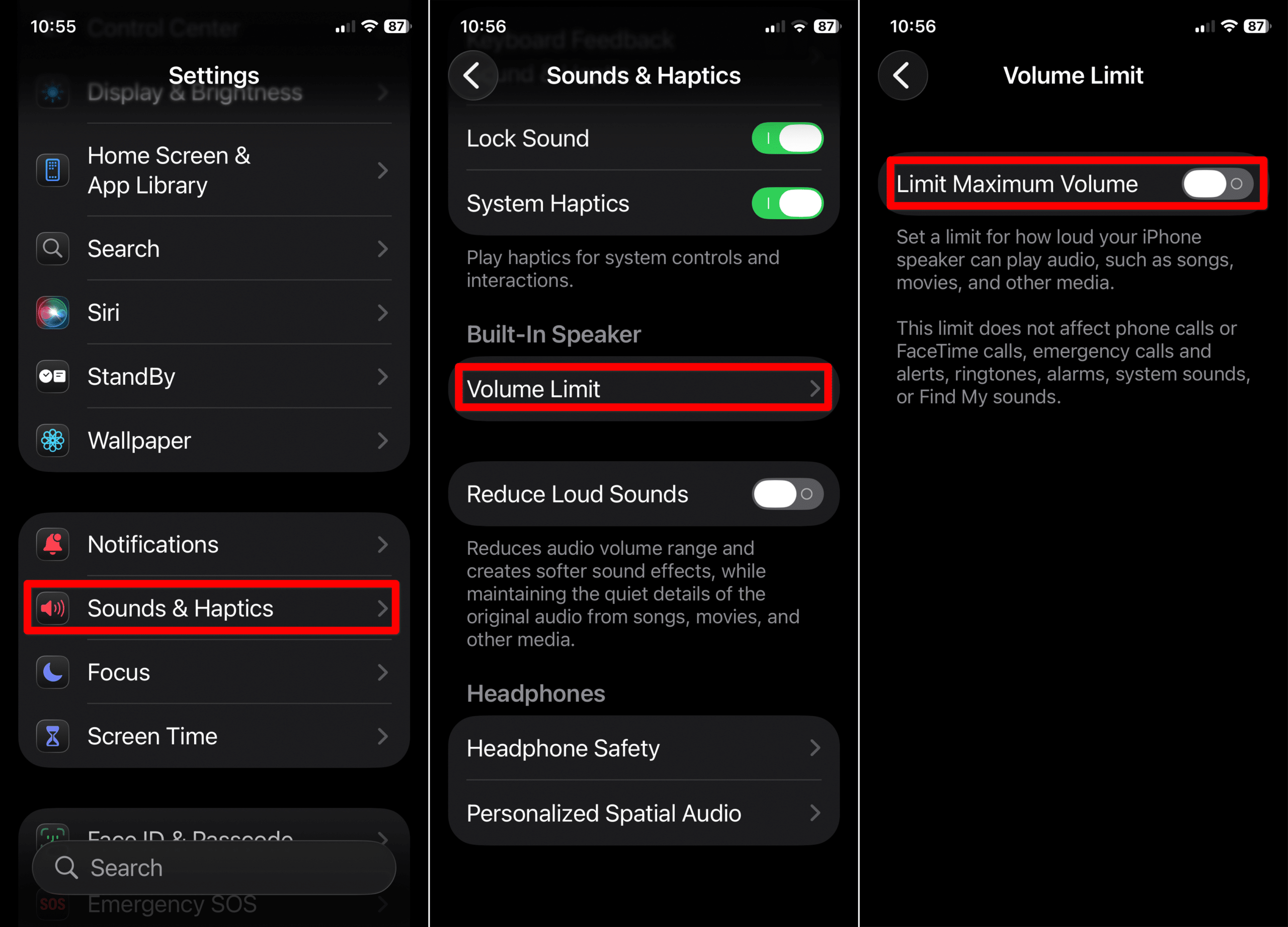
| Disable Volume Limit | Go to Settings > Sounds & Haptics > Volume Limit. Ensure Limit Maximum Volume is OFF. |
| Disconnect Bluetooth | Go to Settings > Bluetooth and turn it OFF. Audio may be routing to a disconnected accessory. |
| Check Audio Balance | Navigate to Settings > Accessibility > Audio/Visual. Ensure the Balance slider is centered. |
| Restart Your iPhone | A reboot can clear temporary software glitches affecting audio output. |
2. Clean and Inspect Speaker Hardware
If settings are correct, inspect the physical components.
-
Remove Obstructions: Take off your case and any screen protector that covers the speaker areas.
-
Clean Speaker Grilles: Using a dry, soft-bristled brush, gently clean the bottom speaker grille and the top earpiece. Avoid using liquids or compressed air.
-
Test with System Sounds: Play a ringtone in Settings > Sounds & Haptics to see if the issue affects all sounds.
3. Update Software and Reset
Persistent issues may require deeper software actions.
-
Update iOS: Install the latest version via Settings > General > Software Update to patch known bugs.
-
Reset All Settings: If problems persist, try Settings > General > Transfer or Reset iPhone > Reset All Settings. This resets network, audio, and system preferences without erasing your data.
⚙️ When to Seek Professional Service
If volume remains low after all steps, a hardware issue is likely. Contact Apple Support or visit an authorized service provider if you notice:
-
Persistently muffled or distorted sound.
-
No sound from one of the speakers.
-
Visible physical damage or debris inside the grilles.
-
Audio works fine with headphones but not on speakers, confirming an output hardware problem.
❓ Frequently Asked Questions
-
Why is volume fine on headphones but low on speakers?
This typically confirms a hardware issue with the iPhone’s built-in speakers or audio amplifier, not a general software fault. -
Does the Volume Limit affect phone calls?
No. The Volume Limit setting usually only caps media playback (music, videos), not call or FaceTime volume. -
Can a software update really fix speaker volume?
Yes. Updates can contain fixes for audio driver bugs or incorrect volume scaling that may cause low output.
✅ Summary: How to Fix Low iPhone Speaker Volume
To systematically restore volume on your iPhone 17 Pro Max:
-
Turn off Bluetooth and any Volume Limit.
-
Clean the speaker grilles and remove any case.
-
Check Audio Accessibility settings for balance issues.
-
Update iOS to the latest available version.
-
If unresolved, Reset All Settings or seek professional hardware service.
By following this logical sequence, you can identify and solve most causes of low speaker volume, from simple settings oversights to more complex hardware needs.