Can You Connect Two Wi-Fi Extenders to One Router? The Better Alternative Explained
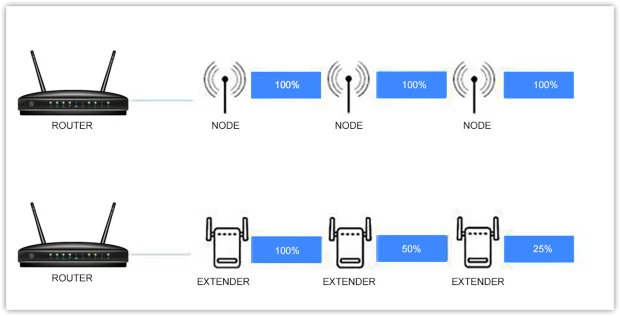
If you have a standard router and struggle with a dead spot in your home, a Wi‑Fi extender can be a quick fix. It extends your wireless signal to areas with spotty coverage. Netgear and TP‑Link offer capable extenders that work well in small homes. But what about larger properties or multiple dead zones? Can you connect two or more Wi‑Fi extenders to a single router?
Technically, yes, you can, and it may work as expected. However, the reliability and effectiveness of multiple extenders are often disappointing. Wireless devices tend to interfere with one another. Two or more extenders operating close together can slow down your network, especially if they are not set to separate wireless channels. Moreover, some extenders require creating a new SSID and password for each device – meaning each extender acts as a separate network. Managing multiple access points and passwords quickly becomes impractical, especially for guests.
The Better Solution: Upgrade to a Mesh Wi‑Fi System
Instead of chaining extenders, consider swapping your router for a mesh Wi‑Fi system. Mesh networks work similarly to a router + extender setup, but with significant improvements. A mesh system uses one main hub connected to your modem and several satellite nodes placed around your home. All nodes broadcast a single, seamless network with one SSID and password.
Mesh technology was originally developed by DARPA (the U.S. Defense Advanced Research Projects Agency) for resilient military networks that could survive node failures. Consumer mesh systems distribute the network across multiple satellites, eliminating dead zones and providing consistent coverage. Benefits include:
-
Single network name and password – no switching or re‑entering credentials.
-
Easy setup – most systems guide you through an app.
-
Better speeds and reliability – data hops intelligently between nodes without the bandwidth loss typical of extenders.
-
Flexibility – you can move nodes to adjust coverage as needed.
How Wi‑Fi Extenders Compare (and Their Drawbacks)
Every extender added to a network reduces total wireless bandwidth because data must make multiple wireless hops: router → extender → device. Each hop cuts throughput. You trade speed for range. This does not affect your ISP‑delivered speed, but it slows down internal connections to client devices. Other factors like interference, congestion, and router limitations can worsen the issue.
When Is a Wi‑Fi Extender the Right Choice?
-
Limited budget – extenders are cheaper than a full mesh system.
-
Small dead zone – not a sprawling coverage problem.
-
Temporary or rental situations where you cannot change the main router.
-
If you already own an extender and want a quick, low‑cost improvement.
Alternative DIY Fix – You can also repurpose an old smartphone as a temporary Wi‑Fi repeater (using built‑in hotspot features) to cover a small dead spot.
Conclusion
While you can connect multiple Wi‑Fi extenders to a single router, the resulting network is often unreliable, slower, and cumbersome to manage. For most homes with more than one dead zone or larger floor plans, a mesh Wi‑Fi system is the superior long‑term solution. It delivers seamless coverage, consistent speeds, and easy management. Only opt for extenders if budget is tight or the problem area is very small.