Apple Music “Not Available in Your Country or Region”: Causes, Fixes, and Workarounds
The Frustrating Region Lock Error
Apple Music has a large collection of music for users to dig into, but every now and then you might look for a song and receive the message: “This item is not currently available in your country or region.”
It’s really disappointing, especially if it’s a song you were looking forward to jamming out to. Unfortunately, it’s not always something you can get around. Sometimes the song is legitimately not available in your region.
Other times, though, it might just be a bug. This kind of behavior can make Apple Music feel unreliable, but you can often get around those kinds of messages with a few easy fixes.
Why a Song Might Be Unavailable
The unfortunate truth about apps like Apple Music is that not every song is always going to be available in every location. Most of this comes down to rights—with the specifics ranging from licensing rights to copyrights and other legal issues.
| Reason | Explanation |
|---|---|
| Licensing Rights | Apple’s deals with record companies vary by region |
| Copyright Issues | Legal restrictions in certain countries |
| Regional Availability | Media availability can vary by country—or even within a country |
| Expired Deals | When licensing deals end, song availability can shift dramatically |
| Payment Issues | Outdated or unsupported payment information |
| Corrupted Files | Previously downloaded files may become corrupted |
| DRM Verification | Apple Music uses DRM to protect content; verification issues can limit access |
The Bottom Line: Media availability is often outside Apple’s control. The company is beholden to region locks and licensing agreements.
Quick Fixes for Common Bugs
Before assuming the worst, try these fixes:
1. Verify the Song’s Availability
-
Search for the song in Apple Music.
-
If another copy appears and plays normally, the original version is no longer available.
-
Delete the grayed-out version from your library.
-
Re-add the new version instead.
Pro Tip: This is especially common if you recently moved to Apple Music from another service. When you transfer playlists, the same versions might not be available on Apple’s service.
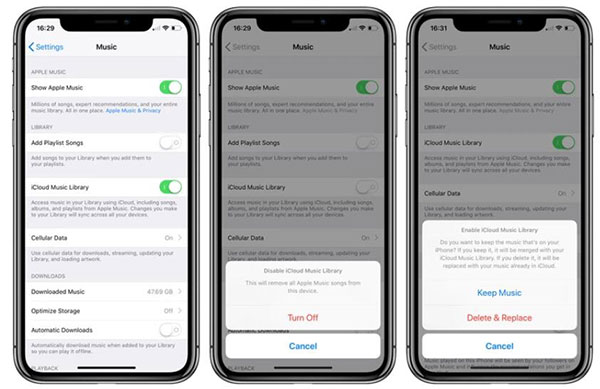
2. Check Sync Library and Account Settings
Apple recommends ensuring:
| Setting | What to Check |
|---|---|
| Sync Library | Turned on in Settings |
| Account | All devices signed into the correct account |
| Sign Out/In | Try signing out and back in to refresh available songs |
3. Redownload Previously Downloaded Songs
If the unavailable songs were previously downloaded for offline usage:
-
Delete the downloaded files.
-
Redownload them from Apple Music.
Why This Helps: Sometimes files get corrupted, which can cause them to appear unavailable.
4. Update Your Device
Outdated software and hardware have been known to cause problems with Apple account verification. Updating your device if you continue to experience availability issues can help.
Can You Bypass a Region Lock?
If the song you want to listen to is actually locked and not available in your region, unfortunately, there’s not really a lot you can do.
| Method | Does It Work? |
|---|---|
| VPN | ❌ Not recommended—Apple Music uses your Apple account’s region |
| Changing Apple Account Region | ⚠️ Possible but complicated |
| Waiting | ✅ The track may become available in your new region eventually |
| Alternative Service | ✅ Find it through another streaming platform |
Why VPNs Don’t Work: While you can use VPNs to get around some region locking in apps like Netflix, it isn’t recommended for Apple Music because it utilizes the region and country that your Apple account is set to.
Changing Your Apple Account Region
If you genuinely want to change your Apple account region to get around a region lock, you’ll need to:
-
Spend any remaining account credit in your old region.
-
Cancel all subscriptions set up in your old region.
-
Change your region in your Apple account settings.
-
Set up new subscriptions in the new region.
⚠️ Important: Apple manages all of its content based on your account’s region, so everything would need to be canceled and set up in the new region. This also means you might run into the problem if you’re trying to listen to music while traveling in a region outside of the one you have set up.
Other Causes of Unavailable Songs
| Cause | Details |
|---|---|
| Outdated Payment Info | Can happen when you move regions |
| Corrupted Files | Previously downloaded songs may become corrupted |
| Verification Issues | Apple Music uses DRM; verification failures can limit access |
| Outdated Software | Old iOS/macOS versions can cause verification problems |
Why DRM Matters: Because Apple Music uses DRM (digital rights management) to protect its content from digital pirates, verification issues might limit your access to music. Many of the issues highlighted above can trigger DRM issues, especially if Apple runs into problems when verifying your subscription or region information.
Comparison Table: Causes and Solutions
| Cause | Solution | Difficulty |
|---|---|---|
| Song genuinely unavailable | Wait or use another service | N/A |
| Bug/glitch | Delete and re-add song; sign out/in | Easy |
| Playlist transfer issue | Find alternative version | Easy |
| Sync Library disabled | Enable Sync Library | Easy |
| Corrupted download | Delete and redownload | Easy |
| DRM verification failure | Update device; sign out/in | Moderate |
| Payment issue | Update payment information | Easy |
| Region lock | Change Apple account region | Advanced |
Frequently Asked Questions
Q: Why does Apple Music say a song is not available in my country?
A: It’s usually due to licensing agreements, copyright restrictions, or regional availability. Sometimes it’s just a bug.
Q: Can I use a VPN to bypass Apple Music region locks?
A: No. Apple Music uses your Apple account’s region, not your IP address. VPNs won’t help.
Q: How do I fix the “not available in your region” error?
A: Try searching for the song again, delete and re-add it, enable Sync Library, sign out and back in, or update your device.
Q: What if a song is genuinely unavailable in my region?
A: Unfortunately, there’s not much you can do. You can wait for it to become available, or find it through another streaming service.
Q: Can I change my Apple account region to access more music?
A: Yes, but it’s complicated. You must spend any remaining credit, cancel all subscriptions, and set everything up again in the new region.
Q: Why did a song suddenly become unavailable?
A: Licensing deals change periodically. When they end, song availability can shift dramatically.
Q: How does DRM affect Apple Music availability?
A: Apple Music uses DRM to protect content. If verification fails—due to outdated payment info, software, or region issues—access to music can be limited.
Quick Reference Summary
| Issue | Quick Fix |
|---|---|
| Song shows as unavailable | Search again; delete and re-add |
| Playlist transfer issue | Find alternative version |
| Sync Library disabled | Enable in Settings |
| Account issues | Sign out and back in |
| Corrupted download | Delete and redownload |
| DRM verification failure | Update device; check payment info |
| Region lock | Wait, use another service, or change region |
Final Thoughts
The “not available in your country or region” error is one of the most frustrating experiences on Apple Music, but it’s not always permanent. Often, it’s just a bug that can be fixed with a few simple steps.
The bottom line: Before assuming the worst, try the quick fixes outlined above. If the song is genuinely locked to another region, your options are limited—but understanding why it happens can at least save you from endless troubleshooting. Apple Music offers a lot of features, like lossless audio support, but the company is still beholden to region locks and licensing.