STARSAT SR-5020HD Software Update 2026
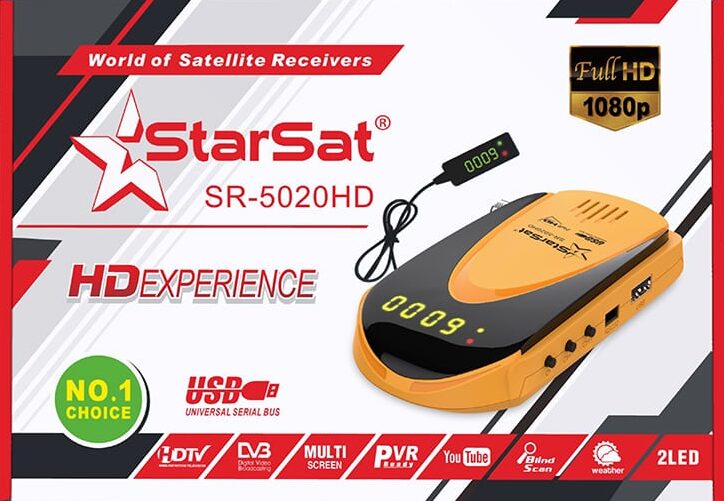
STARSAT SR-5020HD Software Update (2026 Guide): Latest Versions, Fixes & Real Experience
If you’ve been using the StarSat SR-5020HD, you already know it’s one of those receivers that “just works”… until it doesn’t. After more than a decade dealing with satellite receivers, firmware issues, and client setups, I can tell you this: keeping your software updated is not optional it’s the difference between smooth performance and endless frustration.
In this guide, I’ll walk you through everything about the STARSAT SR-5020HD software update, including real-world insights, version differences, common mistakes, and how to choose the right firmware.
Why Updating SR-5020HD Software Actually Matters
On paper, updates look boring bug fixes, stability improvements, etc. But in reality, every update can fix things that drive you crazy daily:
- Channels not opening or freezing
- Slow channel switching
- EPG not loading properly
- Compatibility issues with new transponders
- Random reboots (this one is very common on older versions)
From experience, most users only update when something breaks. That’s a mistake. Some updates especially from 2025 onward improve signal handling and server stability significantly.
Latest STARSAT SR-5020HD Software Versions
Here are the most recent updates you should focus on:
- SR-5020HD_V3.83_14042026 (Latest)
- SR-5020HD_V3.82_05032026
- SR-5020HD_V3.80_04032026
- SR-5020HD_V3.77_07012026
Older but still widely used stable builds:
👉 Real advice:
Don’t automatically install the latest version. I’ve seen cases where V3.83 worked perfectly, and others where users downgraded to V3.80 for better stability.
Key Features of STARSAT SR-5020HD
Before updating, it helps to understand what this receiver is capable of:
- Supports DVB-S / DVB-S2 (MPEG-2, MPEG-4, H.264)
- Works with Ku-band and C-band satellites
- Full HD support up to 1080p 60Hz
- Advanced search options: Blind Scan, Network Search
- Supports DiSEqC 1.0 / 1.1 / 1.2 / USALS
- Stores up to 5000 channels
- Multi-language support (menu, audio, subtitles)
- USB software updates
In real usage, the Blind Search + fast channel switching is where this device shines especially if you frequently scan new frequencies.
How to Update STARSAT SR-5020HD (Step-by-Step)
This is where most people mess up. I’ve seen receivers get stuck on boot just because someone rushed the process.
1. Prepare USB Flash Drive
- Format it to FAT32
- Copy only the firmware file (e.g.,
.bin)
2. Insert USB into Receiver
- Go to: Menu → Tools → Upgrade by USB
3. Select Upgrade Mode
- Choose: All Code
4. Start Upgrade
- Confirm and wait
- Do NOT turn off power
👉 Important (from experience):
Power cuts during update = dead receiver (bootloop). Use a stable power source.
Common Problems After Update (And Real Fixes)
1. Receiver Stuck on Logo
This usually happens when:
- Wrong firmware installed
- Interrupted update
Fix:
Reinstall software using recovery or USB again.
2. Channels Missing
After update, channel list often resets.
Fix:
- Run Blind Scan
- Or restore saved channel list
3. Server Not Connecting
Very common complaint.
From real cases:
- Sometimes the issue is not firmware it’s server downtime
- Try another version like V3.80 or V3.75
4. Slow Performance
Ironically, newer versions can feel heavier.
Solution:
- Factory reset after update
- Avoid restoring old settings
Best Firmware Version (From Experience)
If you ask technicians, you’ll get different answers. But based on real usage:
- V3.83 (2026) → Latest features, but may vary in stability
- V3.80 (2026) → Balanced and reliable
- V3.75 (2025) → Very stable for long-term use
👉 My honest recommendation:
Start with V3.80, then test V3.83 if you want the newest improvements.
Pro Tips Most Guides Don’t Tell You
After working on dozens of receivers, here are things beginners always overlook:
✔ Always Factory Reset After Update
Skipping this causes weird bugs freezing, missing channels, etc.
✔ Don’t Update Just Because It’s New
If your receiver is stable, think twice.
✔ Keep Backup of Working Version
I personally keep 2–3 versions on USB at all times.
✔ Avoid Random Firmware Sources
Only use trusted files. Wrong firmware = soft brick.
Final Thoughts
The STARSAT SR-5020HD software update process is simple but the decisions around it aren’t. The difference between a smooth receiver and a frustrating one often comes down to choosing the right version, not just the latest one.
From years of hands-on experience, I can tell you:
- Stability beats new features
- Testing matters more than version number
- And backups save you hours of headache
If you treat firmware updates carefully, this receiver can easily keep performing like new even after years of use.