How to Change the Apple Maps Navigation Voice (and Unlock iOS 27 Expressive Siri Voices)
Customizing Your Navigation Experience
Many navigation apps offer voice-based turn-by-turn directions, including Apple’s own Apple Maps tool. iPhone owners who use Apple Maps on a regular basis may want to customize the voice used for those directions to improve the overall experience.
The good news is that changing the Apple Maps navigation voice is relatively easy. The bad news is that Apple Maps doesn’t offer a built-in catalog of voices to choose from. Instead, the app shares the same voice as Siri, iPhone’s voice assistant.
That’s why changing the Maps voice requires going to the Siri menu in the Settings app, instead of diving into the navigation app’s various menus.
How to Change the Apple Maps Voice in Settings
To change the Apple Maps voice, follow these steps:
Step-by-Step Instructions
-
Open the Settings app on your iPhone
-
Tap on Siri
-
Tap on Voice
-
Choose from the available Variety (accent) options:
-
American
-
Australian
-
British
-
Indian
-
Irish
-
South African
-
(Additional options depending on your language settings)
-
-
Under Voice Type, select a specific voice option
Note: According to Apple’s description on an iPhone 14 Pro (iOS 27 beta installed), “Siri, Maps Turn-by-turn guidance, and Listen to Page in Safari” will use the selected voice.
Changing the Language
If you want a different language:
-
Go to the Language menu in the Siri section of the Settings app
-
Make your selection
-
Return to the Voice menu to see the available voices for that language
Additional Maps Settings
For other customizations, you can go to Settings > Apps > Maps to adjust other Apple Maps preferences.
Understanding Siri Voices and Accents
When the phone’s language is set to English, the voice variations may include:
| Accent | Voice Options |
|---|---|
| American | 5 distinct voices (not labeled male/female) |
| Australian | Multiple options |
| British | Multiple options |
| Indian | Multiple options |
| Irish | Multiple options |
| South African | Multiple options |
Important: Siri voices and accents may differ depending on market and device capabilities. Some accents may have fewer voice options than others.
iOS 27’s Expressive Siri Voices: What You Need to Know
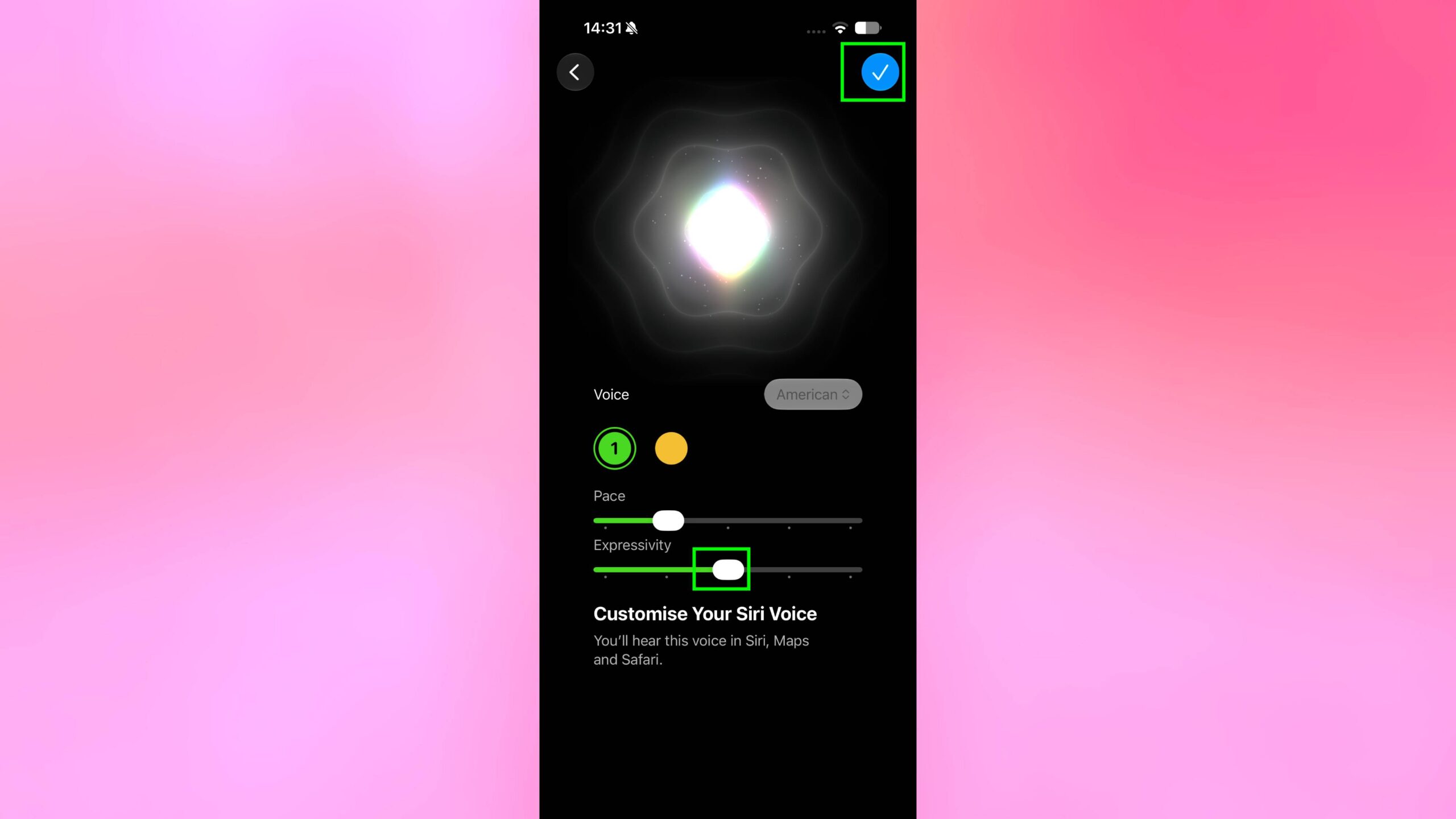
iPhone users updating to the iOS 27 beta may be interested in changing the Siri AI voice to one of the more expressive options. Apple uses an on-device AI model to allow these customizations for the Siri chatbot.
Key Features of Expressive Siri Voices
| Feature | Description |
|---|---|
| Expressivity Slider | Adjusts how expressive the Siri voice sounds |
| Pace Slider | Controls the speaking speed |
| On-Device AI | Processed locally for privacy and speed |
| Natural Language | More human-like speech patterns |
Availability: In July 2026, Apple’s iOS 27 beta 3 enabled the Expressivity and Pace sliders in the Siri settings.
Hardware and Regional Limitations
Hardware Requirements
Users will need a device with at least 12 GB of RAM to access the expressive Siri voices.
| Compatible iPhone Models | Compatible iPad Models |
|---|---|
| iPhone Air | M4 iPad Pro or later |
| iPhone 17 Pro | iPadOS 27 required |
| iPhone 17 Pro Max | |
| iPhone 18 Pro (coming Sept 2026) | |
| iPhone 18 Pro Max (coming Sept 2026) | |
| iPhone Fold (coming Sept 2026) |
Important: The new Siri will be available in English initially, with other languages to follow.
Regional Limitations
| Region | Availability of Expressive Siri Voices |
|---|---|
| United States | ✅ Available |
| United Kingdom | ✅ Available |
| Canada | ✅ Available |
| Australia | ✅ Available |
| European Union | ❌ Not available initially (Siri AI blocked) |
| China | ❌ Not available (Apple Intelligence blocked) |
The Bottom Line: Apple customers in the European Union and China will not be able to use the expressive Siri voices as the Siri AI chatbot will not be available on iPhone and iPad in EU countries initially. Similarly, Chinese users may not have access to Apple Intelligence features, including the new Siri AI, once iOS 27 and iPadOS 27 are released.
Comparison Table: Basic vs. Expressive Siri Voices
| Feature | Basic Siri Voice | Expressive Siri Voice (iOS 27) |
|---|---|---|
| Availability | All iPhones | 12GB+ RAM required |
| Expressivity Slider | ❌ No | ✅ Yes |
| Pace Slider | ❌ No | ✅ Yes |
| On-Device AI | Limited | Advanced |
| Languages | Multiple | Initially only English |
| Hardware | Any iPhone | iPhone Air, 17 Pro, 18 Pro, Fold |
Frequently Asked Questions
Q: How do I change the Apple Maps navigation voice?
A: Go to Settings > Siri > Voice and select your preferred accent and voice type. This affects Siri, Maps turn-by-turn guidance, and Listen to Page in Safari.
Q: Does changing the Siri voice affect Apple Maps?
A: Yes. Apple Maps uses the same voice as Siri for turn-by-turn navigation directions.
Q: What are the expressive Siri voices in iOS 27?
A: Expressive Siri voices use on-device AI to provide more natural, human-like speech with adjustable expressivity and pace sliders.
Q: Which devices support expressive Siri voices?
A: Devices with at least 12 GB of RAM, including iPhone Air, iPhone 17 Pro, iPhone 17 Pro Max, and upcoming iPhone 18 Pro, Pro Max, and Fold models.
Q: Is the expressive Siri voice available in all countries?
A: No. It’s initially available in English-speaking countries. Users in the European Union and China will not have access due to regional restrictions.
Q: Can I use expressive Siri voices on iPad?
A: Yes, on iPad models with at least 12 GB of RAM (M4 iPad Pro or later) after downloading iPadOS 27.
Q: Why can’t I see the expressive voice options on my iPhone?
A: You may need a compatible device (12GB+ RAM) running iOS 27 beta, and you must be in a supported region.
Quick Reference Summary
| Action | Path |
|---|---|
| Change Maps/Siri Voice | Settings > Siri > Voice > Choose Accent & Voice Type |
| Change Language | Settings > Siri > Language |
| Additional Maps Settings | Settings > Apps > Maps |
| iOS 27 Expressive Voices | Settings > Siri > Voice > Expressivity & Pace sliders |
Final Thoughts
Apple Maps navigation voice is controlled through the Siri settings, making it easy to customize. With iOS 27, expressive Siri AI voices offer more natural and customizable navigation guidance—but they’re limited to newer devices with 12GB of RAM and certain regions.
The bottom line: Whether you want a British accent or the new expressive AI voices, you can tailor your Apple Maps navigation experience to your preferences. Just remember that the most advanced options require newer hardware and may not be available in all countries.