

How to Build an Offline Survival Library for When the Internet Goes Down

In the digital age, the prospect of the “grid going down” and the internet becoming inaccessible (or even non‑existent) is a nightmare scenario straight out of a post‑apocalyptic movie. Unfortunately, lack of online access isn’t just dystopian fiction—it’s an everyday reality in some parts of the world, and you may have even lost connection during a power outage.
At least one expert warns that an internet outage is likely enough to warrant having an emergency plan. Speaking with HuffPost, security analyst Robert Siciliano said, “I don’t think it is a matter of ‘if,’ it is simply a matter of ‘when.'” He argues that “everybody should be prepping” for this type of disaster.
How can you be confident you’re ready should the web become unavailable? One option involves creating a survival library of digital resources you can access offline. While you can buy a device that serves this purpose, building your own is a more cost‑friendly alternative. Get started now, and you’ll be prepared to weather a large‑scale internet outage while everyone else is trying in vain to stretch the local cell tower’s hotspot bandwidth.
Table of Contents
-
What Is an Offline Survival Library?
-
Step‑by‑Step: Build Your Own Offline Library
-
Essential Content to Download
-
Buying an Offline Library: Internet‑in‑a‑Box Devices
-
Power Backup: Keeping Your Devices Alive
-
FAQ & Summary
1. What Is an Offline Survival Library?
An offline survival library is a curated collection of digital resources—maps, manuals, medical guides, books, videos—stored locally on your devices so you can access them without an internet connection. It’s your personal archive for when the grid fails, designed to keep you informed, prepared, and even entertained during prolonged outages.
2. Step‑by‑Step: Build Your Own Offline Library
There’s no single way to build your survival library. Your specific approach will depend on your needs and the devices you own.
| Step | Action |
|---|---|
| 1. Assess your needs | What content would be most useful? Maps, medical guides, vehicle manuals, entertainment, reference works? |
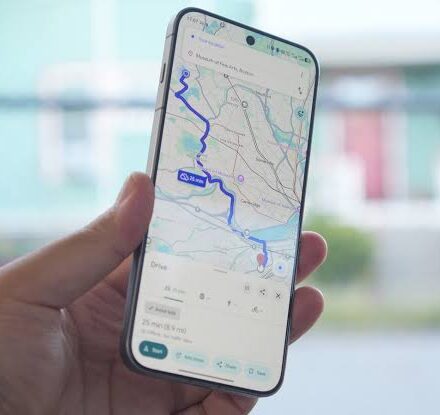
| 2. Download maps | Use Google Maps offline feature; download transit maps, topographical maps, or regional maps. |
| 3. Save reference materials | Download Wikipedia articles, medical first‑aid guides, or entire Wikipedia snapshots. |
| 4. Collect manuals | Download user manuals for your devices, vehicles, and appliances. |
| 5. Stock books & guides | Use Project Gutenberg for free public domain books; download practical how‑to guides. |
| 6. Add video content | Download YouTube tutorials, survival guides, or even entertainment to offline storage. |
| 7. Distribute across devices | Store content on multiple devices (phone, tablet, e‑reader, laptop) so you’re not dependent on a single point of failure. |
3. Essential Content to Download
| Category | Where to Get It |
|---|---|
| Maps | Google Maps (offline mode), public transit authority websites, USGS topo maps |
| Wikipedia | Wikipedia’s official “Download as PDF” option; Kiwix for offline reading of full Wikipedia |
| Books | Project Gutenberg (free public domain), Internet Archive, local library apps with offline mode |
| User manuals | Manufacturer websites (search for “manual download”) |
| Medical guides | American Red Cross First Aid app (preloaded offline content), CDC field guides |
| Survival & how‑to | YouTube downloads (via Premium or third‑party tools), survivalist forums, PDF guides |
| Entertainment | Download music, movies, podcasts for offline playback |
Pro Tip: If you want a huge offline reference library, consider using Kiwix to download the entire Wikipedia (text only) or specific Wikipedia topic bundles. The text‑only version of Wikipedia is around 20–30 GB, manageable on a large USB drive or external SSD.
4. Buying an Offline Library: Internet‑in‑a‑Box Devices
If you prefer a ready‑made solution and don’t mind spending money, Internet‑in‑a‑Box devices offer a pre‑loaded offline library. These devices create a local Wi‑Fi hotspot that lets nearby users access large amounts of content without an actual internet connection.
| Device | Storage | Price (approx) | Contents |
|---|---|---|---|
| PrepperDisk | 256 GB | $199.99 | Wikipedia, medical resources, survival guides, maps |
| PrepperDisk | 512 GB | $279.99 | Larger library, more content |
These devices need to be charged (like any portable device), so having backup power is still essential.
5. Power Backup: Keeping Your Devices Alive
Even with a perfect offline library, your devices are useless without power. Include these in your emergency plan:
| Item | Why It’s Important |
|---|---|
| Portable power banks | Pre‑charge several; keep them topped up. |
| Solar charger | For extended outages; can recharge devices and power banks. |
| USB‑C / Lightning cables | Ensure you have cables for all your devices. |
| Car charger | Use your vehicle as a backup power source. |
6. FAQ & Summary
Q: How much storage do I need for a basic offline library?
A: A basic library with maps, a few hundred books, medical guides, and user manuals can fit on a 64–128 GB USB drive. For a full Wikipedia snapshot, plan on 20–100 GB depending on media inclusion.
Q: Can I share my offline library with others?
A: Yes. An “internet‑in‑a‑box” device creates a local Wi‑Fi network, allowing anyone nearby to connect and browse the stored content. For your own device, you can lend the USB drive or share files via Bluetooth.
Q: Is a prepper library legal?
A: Yes, as long as you only download content you’re legally allowed to store (public domain, purchased media, or materials for personal use). Respect copyright laws.
Summary Table: Offline Survival Library at a Glance
| Component | DIY Approach | Buy‑Ready Approach |
|---|---|---|
| Content | Download maps, Wikipedia, books, manuals, videos | Pre‑loaded on device (e.g., PrepperDisk) |
| Storage | USB drive, microSD card, external SSD, internal device memory | Built‑in storage (256 GB / 512 GB) |
| Cost | Free (content) + cost of storage | $199–$280 |
| Access | Local files on your device(s) | Local Wi‑Fi hotspot, multiple users |
| Power | Device battery; backup chargers | Device battery; backup chargers |
Conclusion
Whether you build your own offline survival library or buy a ready‑made solution like PrepperDisk, taking this step now is a wise investment in peace of mind. When a grid failure or internet outage strikes, having instant access to maps, medical guides, manuals, and reference materials can make all the difference.
Start by assessing what content you’d miss most, download it to your devices, and ensure you have backup power to keep them running. A few hours of preparation today could save you days of frustration tomorrow.
![Facebook currently down for some users [U: Fixed]](https://real4web.com/wp-content/uploads/2026/03/biggest-internet-outages-fWQqv7-440x440.jpg.webp)

