How DVDs Store Data: The Technology Behind Optical Discs
Between the ubiquity of VHS cassettes and the convenience of digital streaming—not to mention the many nostalgic forgotten formats like LaserDisc—DVDs reigned supreme in the home entertainment scene. With affordability and resilience, DVDs could store digital information on their internal reflective layers and, depending on the precise model, even rewrite their information for convenient storage purposes. Whether you were watching movies or sharing data between friends, DVDs facilitated it all throughout the early 2000s, and with proper care, DVD and Blu-Ray collections can still last a long time today.
DVD Structure and Materials
DVDs are similar to digital compact discs (CDs), with approximately the same size, thickness, and materials. Rather than a drastic difference in materials or manufacturing, DVDs differentiated themselves from CDs and other similar formats through their use of multiple data storage layers, made up of polycarbonate plastic injected just below the disc’s surface. These layers could be read and parsed by a red laser from a DVD player or PC disc drive, allowing you to access and play the files stored within.
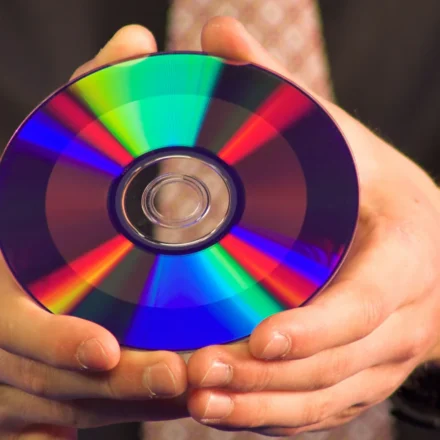
Both sides of a DVD are made of polycarbonate (PC), but the underside is transparent, while the top side typically has a label on it. Underneath the base layer of the DVD’s surface is a second reflective layer composed of metals like aluminum and gold. This is why, when you hold up the bottom of a DVD to a light, it shines in a distinctive rainbow of colors.
How Data Is Stored and Read
Within the underside of a DVD is a spiral track of data, spinning outward from the center. Along the length of this spiral track are a multitude of microscopic bumps, also known as pits.
How a DVD player reads the disc:
-
Laser emission: The DVD player shines a red laser light onto the bottom side of the disc.
-
Penetration: The laser penetrates the polycarbonate layer and reaches the pits on the reflective layer.
-
Reflection detection: A sensor next to the laser emitter determines when and to what intensity the light is being reflected back.
-
Binary decoding: As the disc spins, the sensor parses the presence or absence of pits as binary code. The entire sequence stored within the data track gradually adds up to form whatever files are stored on the DVD.
Read-Only vs. Rewritable DVDs
-
Read-Only DVDs (DVD-ROM): The pits are imprinted during manufacturing and cannot be changed afterward. This is the standard for commercial movies and software.
-
Rewritable DVDs (DVD-RW, DVD+RW): These use a special phase-changing material. When a laser is shone on this material, it changes states between amorphous and crystalline, creating a similar effect to the pitted discs that a DVD player can parse. Since the material’s state can always be changed, you can always alter the content present on the DVD.
DVDs vs. CDs: The Difference
CDs and read-only DVDs are made in a similar fashion and with similar materials. Both use microscopic pits in a reflective layer, and both are read by a laser emitter and sensor. The key difference is that the pits on a DVD are exponentially smaller, so more of them can be clustered together along its surface. This results in a storage medium with far more storage capacity.
Additionally, the laser in a DVD player has a narrower focus, allowing it to read those smaller, more tightly packed pits. The laser in a CD player is too wide to properly parse the pits in a DVD, so nothing would happen if you tried to play a DVD in a CD player.
DVDs vs. Blu-Ray Discs
Blu-Ray discs use many of the same manufacturing principles and materials as DVDs but take the technology even further:
| Feature | DVD | Blu-Ray |
|---|---|---|
| Laser color | Red | Blue-violet |
| Laser focus | Narrow | Even narrower |
| Pit size | Smaller than CD | Even smaller than DVD |
| Data layers | 1–2 layers | Up to 4 layers (100GB) |
| Storage capacity | 4.7GB (single-layer), 8.5GB (dual-layer) | 25GB (single-layer), 50GB (dual-layer) |
| Reading mechanism | Standard laser | Additional lens closer to the reading mechanism |
Despite only using a single layer versus a DVD’s two-layer approach in some cases, Blu-Rays have even more tightly packed data tracks with even smaller and more numerous pits. A Blu-Ray player uses a blue-violet laser light with an even narrower focus, with the extra benefit of an additional lens sitting closer to the reading mechanism. This all adds up to even greater storage capacity, which also means higher fidelity for video files.
Summary
| Format | Laser Type | Pit Size | Max Storage | Typical Use |
|---|---|---|---|---|
| CD | Red (780nm) | Larger | 700MB | Music, small data |
| DVD | Red (650nm) | Smaller | 8.5GB (dual-layer) | Movies, larger data |
| Blu-Ray | Blue-violet (405nm) | Smallest | 100GB (quad-layer) | HD movies, large data |
Conclusion
DVDs revolutionized home entertainment by offering more storage than CDs while remaining affordable and durable. Their ability to store data in microscopic pits on multiple layers, read by a focused red laser, made them the dominant format for years. As technology advanced, Blu-Ray discs pushed the boundaries even further with blue-violet lasers and even smaller pits. These physical discs remain a great way to store data, which may be part of why Gen Z is getting more interested in physical media.